
 Book a Meeting
RFQ Automation: The Smarter Way to Increase Sales and Reduce Manual Work


Here’s how you lose a prospect today. A request comes in, and someone from your sales team pulls product details manually. Then they loop in engineering for validation, check prices, and spend hours stitching a response. By the time it’s ready, boom. Your buyer has already moved on.
This is a classic case of an outdated sales approach. And if it sounds familiar, you need to give it new life – with RFQ automation.
Automating RFQ (request for quotation) means using software to handle repetitive tasks like data collection, pricing calculations, approvals, and quote generation. All this happens without constant back-and-forth emails or manual entries.
A McKinsey & Company research shows that automation is reducing manual effort by up to 30%. Applied to RFQs, this translates directly into quicker turnaround times, more consistent pricing, and a higher chance of winning deals.
So, it’s significant for modern businesses, which is why you need to read on. Below, we’ll break down how automated RFQ works, why it matters for you, and how you can implement it to boost sales.
RFQ Automation vs. Manual Processes: What’s Slowing You Down?
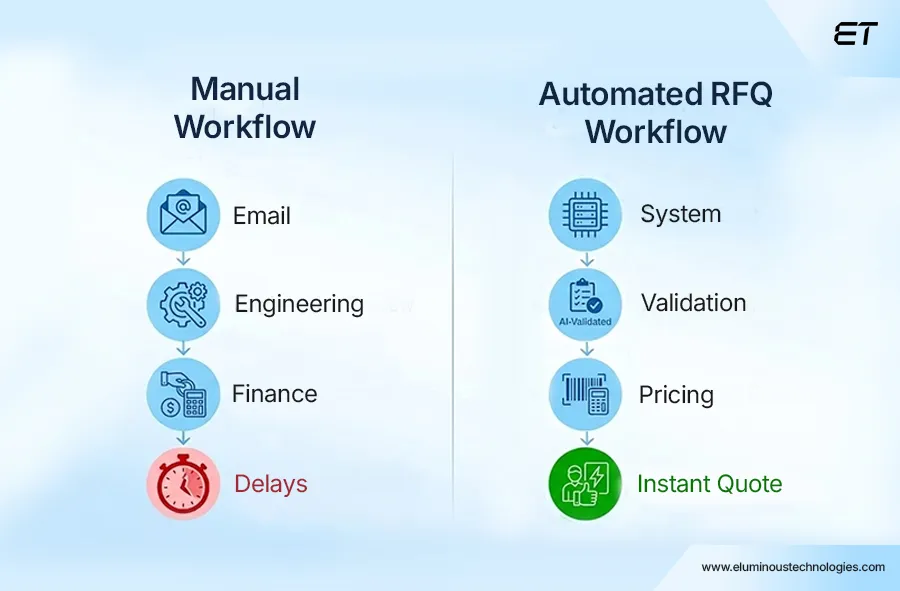
Let’s say you’ve a mid-sized manufacturing company handling multiple quote requests every day. A potential customer sends in an RFQ for a custom component. The sales team knows this is a high-intent lead, so they need to respond quickly and accurately.
If everything goes well, it could convert into real revenue. But if there’s a delay, the opportunity will slip away.
Here’s what that typical manual RFQ process looks like:
- The RFQ lands in a shared inbox or with a sales representative.
- Sales reviews requirements and forwards them to engineering for feasibility.
- Engineering validates specs and may request clarifications.
- Sales checks pricing with finance or digs through old spreadsheets.
- Multiple email threads go back and forth to finalize costs and timelines.
- They compile the final quote into a document or PDF.
- The response is sent, often after hours or even days.
On paper, it looks manageable. But every step introduces delays, increases the risk of errors, and creates inconsistencies in pricing and communication.
More importantly, it pulls your sales team away from closing deals and traps them in operational work.
Now, what if instead of relying on manual coordination, automated RFQ systems streamline the entire workflow? They capture request details, validate specifications, generate accurate quotes, and route approvals. That’ll make life easy for you, right?
Here’s how the difference plays out in practice:
| Aspect | Manual RFQ Process | RFQ Automation |
| Response Time | Hours to days | Minutes to hours |
| Data Handling | Scattered across emails and spreadsheets | Centralized and structured |
| Accuracy | Prone to human error | Consistent and rule-based |
| Team Dependency | High cross-team coordination | Streamlined workflows with minimal back-and-forth |
| Scalability | Limited by team bandwidth | Easily handles higher RFQ volumes |
| Sales Focus | Time spent on admin tasks | More time for selling and closing |
At this time, you must be intrigued. “I’ve heard a bit about automation, but automating RFQs? That’s interesting.” These were the words of one of our recent prospects. In the next section, we’ll explain the process in depth.
What Is an Automated RFQ?
An automated RFQ is a system-driven approach to managing quote requests, where software handles much of the manual effort. By manual effort, we mean:
- Collecting data.
- Validating requirements.
- Calculating pricing.
- Generating quotes.
In a typical setup, an automated RFQ system captures request details through a structured form or portal, routes them to the right teams or rules engine, and generates a quote based on predefined logic.
Instead of relying on emails, spreadsheets, and manual approvals, the process becomes smooth like butter.
Now, let’s simplify the concept further.
By RFQ automation, your sales team no longer needs to coordinate every small step.
What makes this especially valuable in manufacturing is the complexity involved. Custom requirements, variable pricing, and multiple dependencies often slow down traditional RFQ handling. Automation brings structure to that complexity.
In practice, you can move away from repetitive coordination and focus on negotiations and closing deals.
How to Automate the RFQ Process
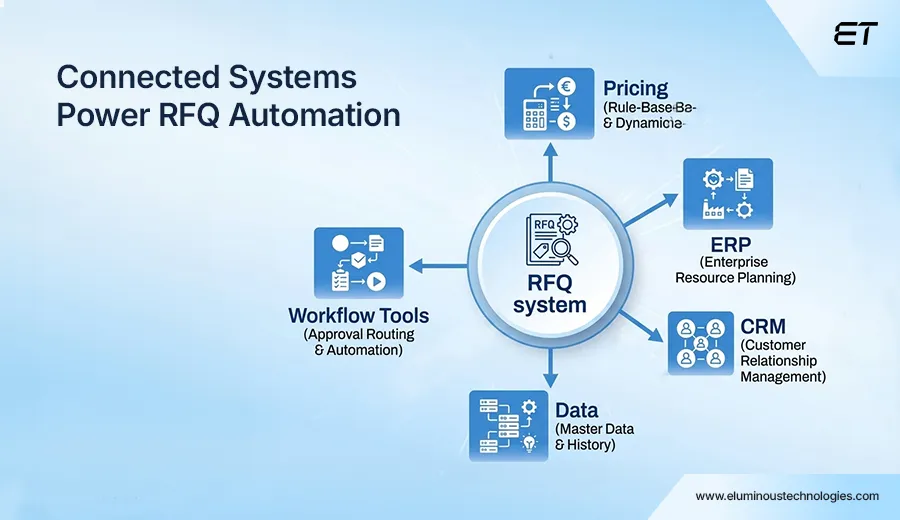
To automate RFQs, you need to build a connected workflow that integrates systems for data handling, validation, pricing, and communication. The key here is minimal manual intervention.
For most manufacturing businesses, you need to focus on solving a specific part of the RFQ lifecycle.
For example:
- You might capture customer requests through a web portal built on platforms like Salesforce or HubSpot.
- Pricing and product data can come from ERP systems such as SAP ERP or Oracle NetSuite.
- Workflow automation tools like Zapier can help connect these systems.
- Custom-built web applications can handle complex pricing logic and quote generation.
So, your goal is to make your stack work together seamlessly.
To break this down, here’s how a typical RFQ automation setup comes together step by step:
- Capturing and structuring RFQ requests.
- Validating requirements and specifications.
- Automating pricing and cost calculations.
- Streamlining approvals and internal workflows.
- Generating and delivering quotes instantly.
Let’s decode each step one by one.
Capturing and Structuring RFQ Requests
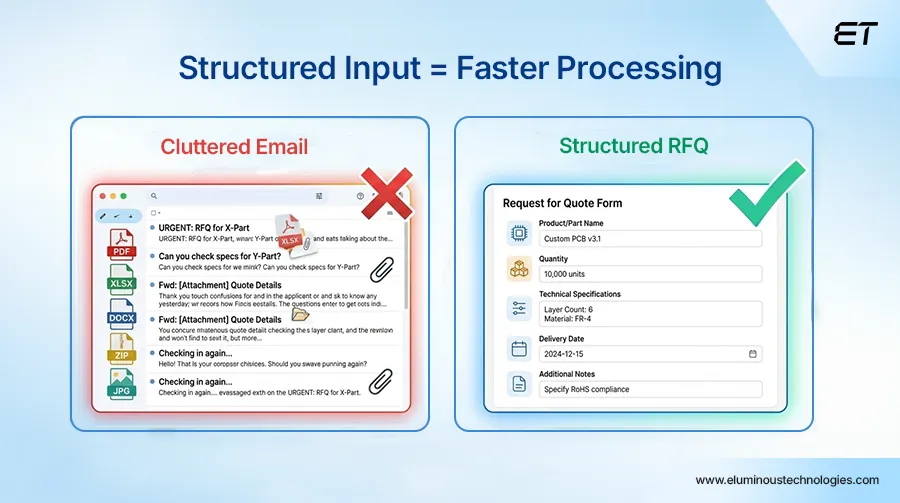
This is where most RFQ processes quietly fall apart.
The reason is simple. Requests are messy, incomplete, and inconsistent. And once bad input enters the system, everything slows down.
Here’s what typically happens in a manual setup:
- RFQs arrive via email, attachments, or even phone calls.
- Key details are in PDFs or across threads.
- Sales reps manually interpret requirements.
- Missing information triggers multiple follow-ups.
Now multiply that by 10 – 20 RFQs a day. You get how everything becomes time-consuming.
Automation fixes this at the entry point.
Instead of letting RFQs come in unstructured, you control how they enter your system.
Think in terms of:
- Structured web forms or portals: Customers submit RFQs through predefined fields (product specs, quantities, timelines, custom requirements)
- Mandatory fields (no more incomplete requests).
- No submission unless the prospect fills in critical data.
- Cuts down back-and-forth instantly.
- File + data standardization
- CAD files, spec sheets, and notes are all in a consistent format.
- No more “where’s that attachment?” loop.
- Auto-tagging and categorization: RFQs are automatically classified based on product type, complexity, or priority
What changes in practice?
Sales doesn’t figure out the RFQ anymore. They receive it already structured and usable.
Also, engineering gets cleaner inputs, which leads to fewer clarifications. Response time starts shrinking from the very first step.
Validating Requirements and Specifications
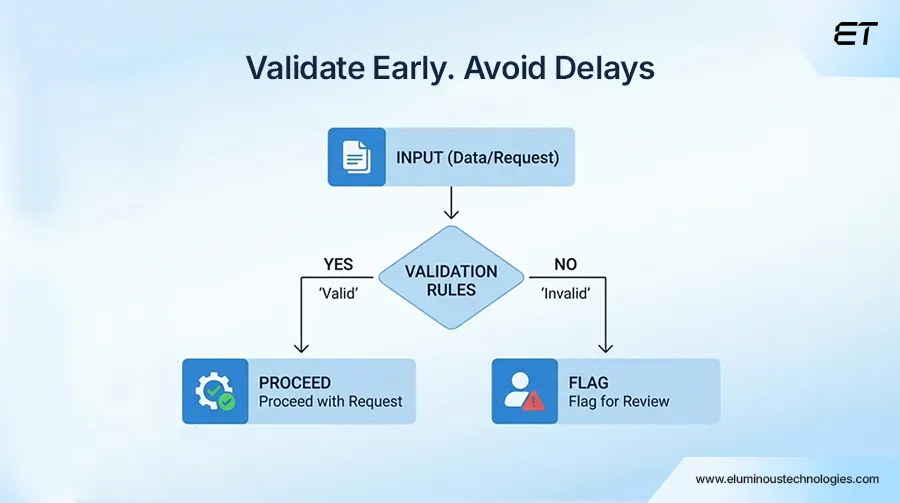
Now comes the part where most RFQs either move forward or get stuck in an endless loop.
In a manual setup, validation usually looks like this:
- Sales forwards the RFQ to engineering.
- Engineering reviews specs and flags gaps.
- Questions go back to sales, then to the customer.
- Responses trickle in (sometimes incomplete).
And just like that, a quick quote turns into a multi-day back-and-forth.
Here’s how RFQ automation makes this process smarter and faster.
- Rule-based validation kicks in instantly: Instead of waiting for engineering to manually review everything, predefined rules address several questions.
- Are specifications within feasible limits?
- Are the required fields complete?
- Does the request match available configurations?
- Built-in logic reduces obvious errors upfront: There are dropdowns instead of free text and configurable options instead of open-ended inputs. You have:
- Fewer unrealistic requests.
- Fewer misinterpretations.
- Less guesswork for your team.
- Conditional workflows do the filtering: Not every RFQ needs deep engineering involvement. So, the system decides:
- Simple, standard requests move ahead automatically.
- Complex, custom requirement routes to engineering.
- Integration with product and engineering data: Systems connected to tools like SAP ERP or Oracle NetSuite can:
- Validate against real inventory or capabilities.
- Check BOM constraints.
- Align with actual production feasibility.
All in all, your team stops reacting to bad inputs and starts working with pre-validated, decision-ready RFQs.
Automating Pricing and Cost Calculations with RFQ Automation
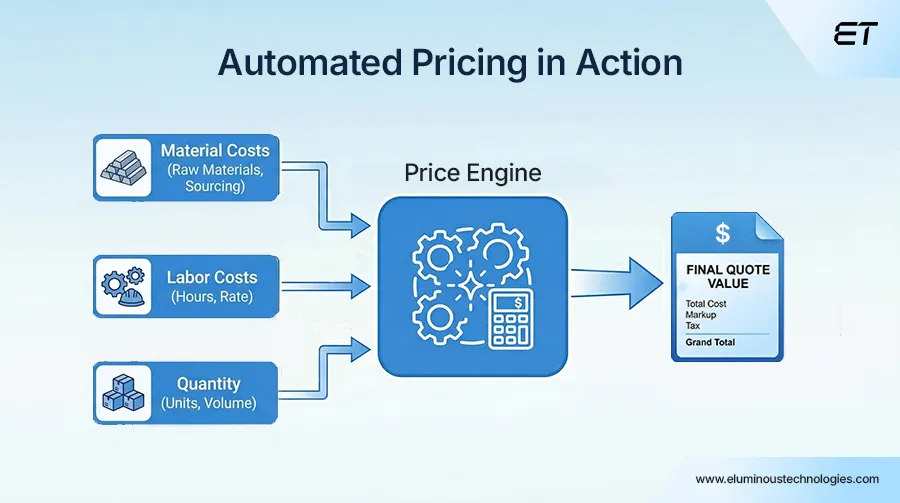
If there’s one stage where delays hurt the most, it’s pricing.
Because until you share a price, there is no deal, right? In a manual RFQ setup, pricing usually follows this cycle:
- Sales digs up old quotes or spreadsheets.
- Finance gets looped in for margins.
- Engineering inputs cost implications for customizations.
- Multiple versions float around before you finalize something.
By the time you arrive at a number, it’s already late. RFQ automation changes this to logic-driven.
Instead of building every quote from scratch, the system calculates pricing based on predefined rules and real-time data.
Here’s how that plays out:
- Predefined logic handles:
- Base pricing.
- Volume discounts.
- Region-specific variations.
- Customer-specific agreements.
- Dynamic cost calculations include:
- Inputs like material costs, labor, and lead times.
- Adjustments that happen in real time as RFQ parameters change.
- Systems like SAP ERP or Oracle NetSuite feed:
- Latest pricing data.
- Cost structures.
- Inventory considerations.
- CPQ (Configure, Price, Quote) solutions have:
- Tools like Salesforce CPQ standardize complex pricing scenarios.
- High utility for configurable or custom manufacturing products.
- Built-in margin protection.
This way, you get quotes generated in minutes, consistent pricing across teams, and a higher chance of winning leads.
Streamlining Approvals and Internal Workflows
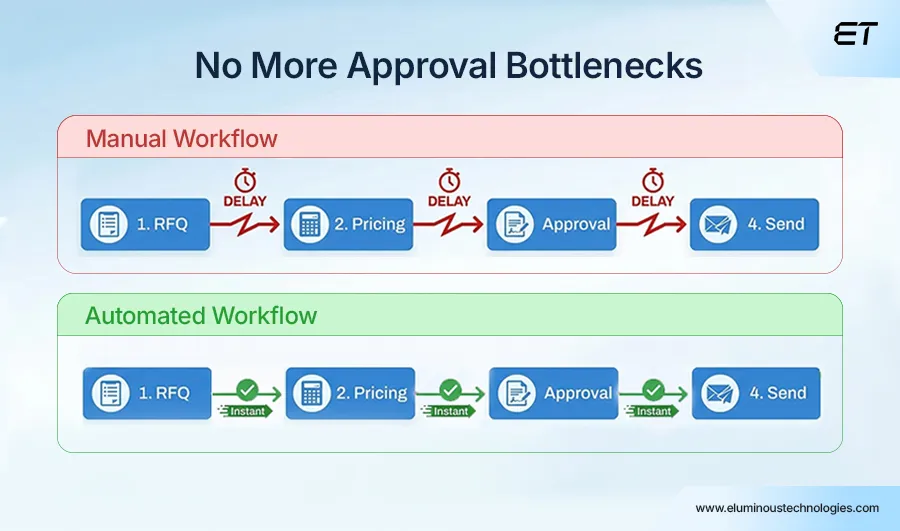
Even after pricing is ready, RFQs don’t move forward immediately.
They wait. Why?
Because someone, somewhere, needs to approve it. That’s the best part of RFQ automation. You don’t lose control.
In a manual setup, you might notice that:
- Emails sit unread.
- Approvals get buried in threads.
- Follow-ups consume a lot of time.
RFQ automation removes the need to chase people by integrating approvals into your workflow.
By automating, you have:
- Predefined approval hierarchies based on deal size, margin, or complexity.
- Automatic routing (no manual forwarding).
- Real-time notifications and reminders.
- Approval tracking and visibility.
- Integration with workflow tools.
The result is significant as your quotes don’t sit idle, and internal delays shrink drastically. Moreover, the entire sales cycle becomes predictable.
Generating and Delivering Quotes Instantly
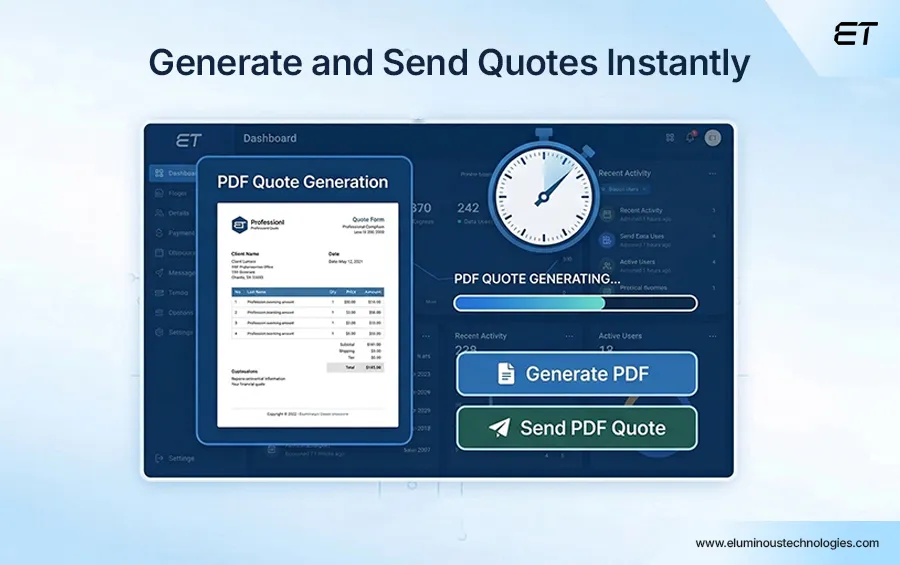
You’ve captured the RFQ.
Validated the requirements.
Calculated pricing.
Got approvals.
Now comes the final step – sending the quote.
In a manual setup, this stage still involves:
- Copy-pasting data into templates.
- Formatting documents (Word, Excel, PDFs).
- Double-checking numbers (again).
- Attaching files and drafting emails.
The entire approach is repetitive, error-prone, and time-consuming.
RFQ automation closes the loop by turning this into a one-click process.
Here’s what that looks like:
- Auto-generated quote documents.
- Standardized branding and formatting.
- Instant delivery options.
- Version control and tracking.
- Integrated communication workflows.
And you know that the company that responds first with a clear, accurate quote often wins the deal.
How RFQ Automation Directly Impacts Sales Performance
In manufacturing, you lose deals due to delays, inconsistent responses, or friction in the buying experience. When your RFQ process is slow or error-prone, it directly affects how quickly you engage prospects.
Automating RFQs turns your sales process into something far more predictable and scalable.
Here’s how that impact shows up in real terms:
| Sales Challenge (Without RFQ Automation) | Sales Impact with RFQ Automation |
| Slow response times lead to missed opportunities | Faster quote turnaround increases win rates |
| Sales teams stuck in admin work | More time spent on selling and closing deals |
| Inconsistent pricing across quotes | Standardized, accurate pricing builds trust |
| Delays due to internal dependencies | Streamlined workflows reduce deal friction |
| Limited ability to handle high RFQ volumes | Scalable processes support business growth |
| Poor visibility into RFQ status | Real-time tracking improves follow-ups and conversions |
The Challenges of RFQ Automation
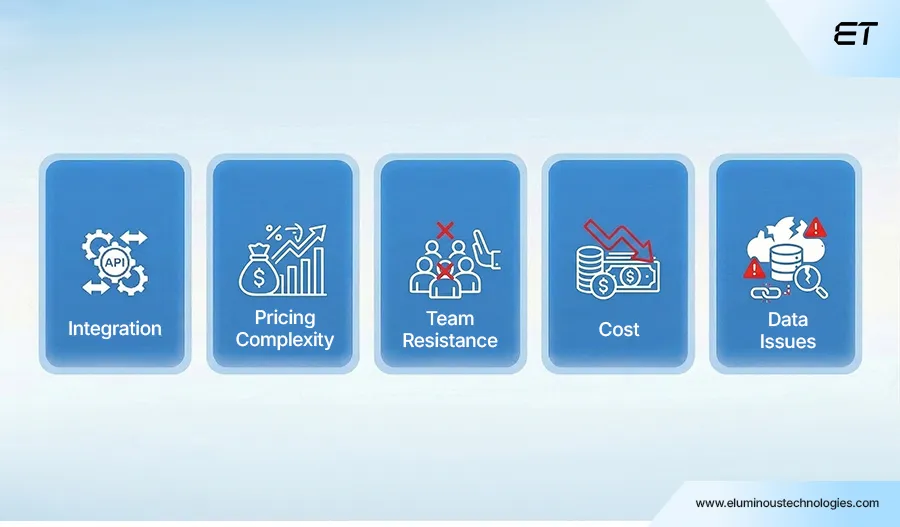
We won’t say that automation is all roses and chocolates. It has clear advantages, but the shift from manual to automated processes comes with its own set of challenges.
Here are the ones that typically surface.
Integrating with Existing Systems Isn’t Always Plug-And-Play
You might already rely on a mix of ERP, CRM, and legacy tools. Connecting these systems so data flows seamlessly (without duplication or conflicts) can take time and careful planning.
Off-the-shelf integrations don’t always fit perfectly, especially when workflows are highly customized.
Defining Pricing Logic Can Get Complex
Automation depends on rules. But in manufacturing, pricing isn’t always straightforward, as you have:
- Custom components.
- Variable material costs.
- Client-specific agreements.
Translating all of this into a structured, rule-based system requires deep alignment between sales, finance, and operations. If you miss something here, your automation becomes unreliable.
Initial Setup Demands Time and Cross-Team Effort
RFQ automation is more than just a tech implementation. You need to overhaul your process with the help of manufacturing web development experts.
In addition, you’ll need input from:
- Sales (RFQ handling).
- Engineering (validation rules).
- Finance (pricing and margins).
Without alignment, automation can break down or fail to deliver expected results. So, before deciding to automate, have a couple of meetings with these departments.
Change Resistance Within Teams
People get comfortable with existing workflows, even if they’re inefficient.
If you even talk about RFQ automation, your sales teams may worry about losing control, and engineering may hesitate to trust automated validations.
So, the adoption depends more on mindset than technology. Your goal shouldn’t be to eliminate complexity. You should aim to manage everything better and explain the ROI to your team.
Upfront Investment and ROI Clarity
Whether it’s custom development or implementing advanced tools, automation requires investment.
For leadership teams, the challenge is:
- Justifying the cost.
- Understanding the payback period.
So, you need to have clear metrics. These days, many automation tools offer free trials. You can always test them in your workflow before committing to the long run.
How to Successfully Implement RFQ Automation
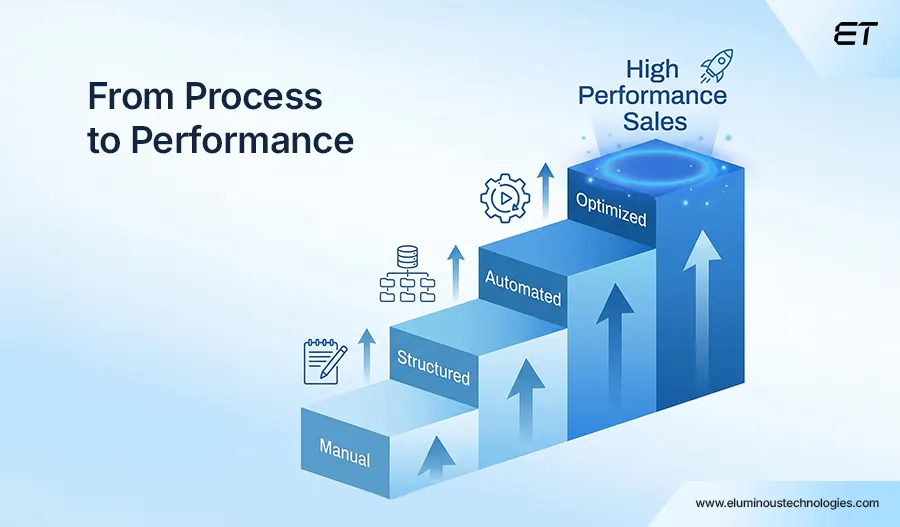
Aristotle once said, ‘The purpose of knowledge is action, not knowledge.’ This proverb sits well with automating RFQs. You might know the concept in theory, but nothing beats actual execution.
Here are seven tips you can follow to move ahead.
1. Start By Fixing the Process, Not Chasing Tools
Before you think about platforms or integrations, map your current RFQ workflow:
- Where do delays happen?
- Which steps are repetitive?
- What requires manual intervention today?
If your process is messy, automation will only make it faster but fail to make it better.
2. Standardize the Essentials
You don’t need to treat every RFQ as a custom project.
Identify:
- Common product configurations.
- Frequently used pricing structures.
- Repeat customer requirements.
The more you standardize upfront, the more effective your automation will be.
3. Build Your Automation in Layers
Trying to automate everything in one go is a classic mistake.
Here’s a smarter approach:
- Phase 1 → Capture and structure RFQs.
- Phase 2 → Automate validation and pricing.
- Phase 3 → Add approvals and quote generation.
This reduces risk and gives your teams time to adapt.
4. Ensure Your Systems Integrate
Your RFQ process likely involves multiple systems, such as CRM, ERP, and pricing tools. This means integration is non-negotiable.
Whether you’re using platforms like Salesforce, SAP ERP, or custom solutions, the goal is simple:
No duplicate data entry.
No disconnected workflows
For seamless integrations, we suggest MS Dynamics 365 or middleware like Workato.
5. Get Cross-Team Buy-In Early
RFQ automation fails when teams don’t trust it.
To develop trust, you need to involve:
- Sales for usability.
- Engineering for validation logic.
- Finance for pricing accuracy.
Remember, when teams contribute to the system, they’re far more likely to adopt it.
6. Define Clear Success Metrics
You shouldn’t implement any technology until you finalize your numbers.
For the best results in RFQ automation, track:
- RFQ response time.
- Quote accuracy.
- Conversion rates.
- Manual effort reduction.
These metrics help justify the investment and optimize over time.
7. Balance Automation with Flexibility
You can’t (or rather shouldn’t) fully automate every RFQ. Because most of them have custom specs, need design adjustments, and feasibility checks. Also, in some cases, you need to create special pricing for strategic clients.
So, the turnaround is to build workflows that:
- Handle standard requests automatically.
- Escalate complex ones intelligently.
At the end of the day, successful RFQ automation comes down to removing friction so your teams can move faster and sell better.
That’s where working with a team experienced in manufacturing-focused web development can make the difference. Such a vendor can help you design and implement RFQ automation that fits your operations.
RFQ Automation Checklist
Save time and use this content as a quick reality check before (and during) implementation:
Process Clarity
- Mapped your current RFQ workflow end-to-end
- Identified bottlenecks (delays, rework, dependencies)
- Separated standard vs. complex RFQs
Data Readiness
- Cleaned and standardized product data
- Updated pricing structures and cost inputs
- Defined rules for discounts, margins, and exceptions
Input Standardization
- Created structured RFQ forms or portals
- Defined mandatory fields (no incomplete submissions)
- Standardized file formats (CAD, specs, attachments)
Validation Logic
- Defined feasibility rules (spec limits, configurations)
- Set conditions for auto-approval vs. manual review
- Mapped when engineering involvement is required
Pricing Automation
- Built rule-based pricing logic
- Integrated real-time data from ERP/finance systems
- Defined margin thresholds and approval triggers
Workflow & Approvals
- Set up approval hierarchies (based on value/margin)
- Enabled auto-routing to relevant stakeholders
- Configured notifications and reminders
Quote Generation
- Designed standardized quote templates
- Automated document generation (PDF/email)
- Ensured version control and tracking
System Integration
- Connected CRM, ERP, and other tools
- Eliminated duplicate data entry points
- Tested data flow across systems
Team Alignment
- Involved sales, engineering, and finance early
- Trained teams on new workflows
- Addressed resistance and usability concerns
Performance Tracking
- Defined KPIs (response time, win rate, effort saved)
- Set up dashboards or reporting
- Established feedback loop for continuous improvement
Rollout Strategy
- Started with a pilot or phased implementation
- Tested with real RFQs before scaling
- Iterated based on actual usage
Summing Up
RFQ automation reduces reliance on manual coordination and enables your sales team to operate faster. More importantly, it turns your RFQ process into a consistent, repeatable system that scales as your business grows.
That said, the real value comes from implementing it thoughtfully. You need to align your workflows, integrate your systems, and ensure your teams are set up to use it effectively.
Because in the end, the companies that respond faster, quote smarter, and operate more efficiently are the ones that win more business. And increasingly, that edge comes from combining automation with AI-driven workflows to make RFQ processes smarter.
Still relying on manual RFQs? Let’s change that. Book a quick Calendly call and see how you can automate your process without the usual complexity.
Frequently Asked Questions
1. How long does it take to implement RFQ automation?
The timeline depends on how complex your current process is. Simple setups (basic forms + workflows) can take a few weeks. Mid-level automation (pricing + approvals + integrations) can need one to three months, while advanced setups (custom logic, ERP/CRM integration, AI) can require over three months.
2. Can RFQ automation handle highly customized manufacturing requirements?
Yes. But you shouldn’t automate everything completely. A well-designed system automatically handles standard and repeat RFQs. It also detects custom requests for manual review. Still, as requirements change, your RFQ automation shouldn’t become rigid.
3. What systems can RFQ automation integrate with?
Most RFQ automation setups integrate with CRM platforms, ERP systems, CPQ tools, and communication tools such as emails, notifications, and workflows.
4. Is RFQ automation suitable for small or mid-sized manufacturers?
Yes, and arguably, they benefit the most. Smaller teams handle multiple roles, struggle with bandwidth, and lose deals due to slower response times. Automating RFQs helps them compete with larger players by improving speed and consistency.


How Enterprise Web Portal Development Supports Multi-Plant Operations
I once spoke with an operations leader at a US-based manufacturing firm. They had grown from two plants to seven…

GraphQL vs REST APIs: Differences, Performance, and When to Use Each
REST and GraphQL are two different approaches to designing APIs that allow applications to communicate with servers. GraphQL vs REST…


