
 Book a Meeting
Your Mobile App UI UX Design Workbook: How to Retain Users and Drive Revenue



- Mobile app UI UX design directly impacts user retention, engagement, and revenue.
- Good UI/UX design works best when built around user intent, not feature lists or internal assumptions.
- You should rely on clear information architecture, intuitive navigation, and fast, responsive performance to prevent churn.
- The design improves measurably when data, user research, and AI-driven insights guide continuous optimization.
- You should treat accessibility, consistency, and usability as top priorities in UI/UX.
What does an app need to do? You might say solve problems, run smoothly, or secure data. Not wrong, but you’re missing the core of modern mobile app UI UX design.
Here’s the answer: It needs to capture attention. Why?
You get around 8 seconds. That’s it. That’s the amount of time you have to impress your users. And good UI/UX is the ticket to your app’s success.
Today, the objectives are clear – with AI and automation in every smartphone, how can you nail UI/UX design for mobile apps? What are the core elements? And how can you measure the impact of UI/UX on your business?
This blog answers each question. So, scroll ahead to get a practical checklist and know the clear-cut elements your UI/UX team can’t miss.
Core Principles of Mobile App UI UX Design
When you think about mobile apps, it’s easy to focus on features: “Does it have this? Does it do that?”
But your users don’t care about features first. They care about how they feel using the app. And that’s where mobile app UI UX design steps in.

Focus on these core principles, and you can move one step ahead in capturing your users’ eyes:
- Clarity
- Consistency
- Speed
- Responsiveness
- Navigation
- Microinteractions
Let’s explore each point in brief.
1. Clarity
Your users shouldn’t have to guess what a button does or hunt for information.
A clean, intuitive interface reduces friction, increases engagement, and directly improves retention. Clarity in mobile app UI UX design leads to faster adoption, fewer drop-offs, and happier users.
2. Consistency
Colors, fonts, icons, and gestures should follow a predictable pattern.
Inconsistent design confuses users and signals a lack of professionalism. Your brand is reinforced with every consistent interaction, making every tap count toward loyalty.
3. Speed and Responsiveness
AI and automation mean users expect instant results.
Slow animations, laggy transitions, or delayed feedback are huge red flags. Remember: every extra second counts toward churn.
4. Intuitive Navigation
Menus, flows, and gestures must feel natural. Users shouldn’t need a manual.
The fewer taps it takes to reach a goal, the higher your engagement and conversion rates.
5. Microinteractions
Tiny animations, feedback signals, and interactive details may seem trivial, but they make an experience enjoyable. Delight keeps users returning, and that retention directly impacts revenue.
Mobile App UI UX Design: The Main Pillars
If principles are the why, pillars are the how. They’re the backbone of mobile app UI UX design. Below, you’ll find brief details on each pillar.
1. User-Centered Research
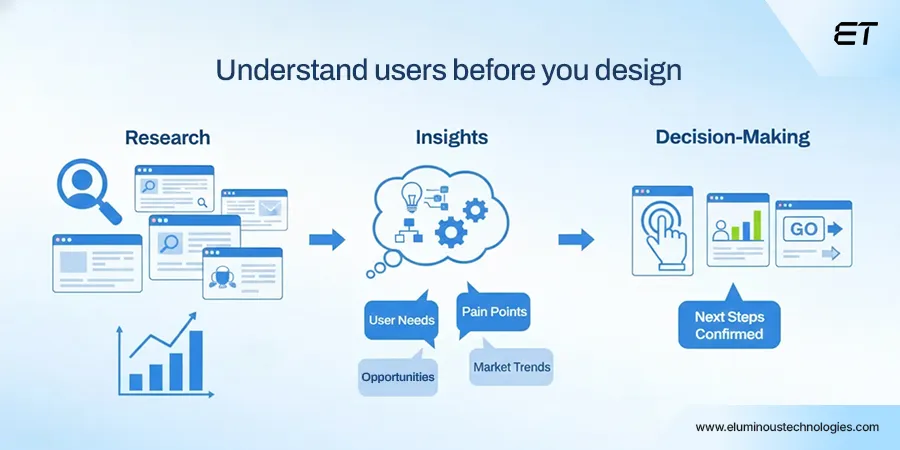
User-centered research is the structured process of understanding your audience’s behaviors, needs, and motivations. Basically, it’s a 360° view of the user journey, combining qualitative insights with quantitative data.
Here’s the bottom line for executives: every dollar invested in development has risk. Skip research, and you’re building in the dark.
Proper user-centered research:
- Ensures the app solves real problems.
- Improves retention by helping users stay longer because the app aligns with their habits and expectations.
- Cuts wasted spending by highlighting which features users value.
- Supports strategic prioritization: which flows, screens, or features move the needle for engagement and revenue?
Here are some of the best ways to implement it in your mobile app UI UX design process:
- Behavioral analytics: Track real user actions to identify friction points and high-value interactions.
- In-context interviews: Talk to users while they’re using the app, i.e., capture instinctive reactions.
- Persona and journey mapping: Build archetypes and map their flows to predict and optimize decision-making.
- Continuous feedback loops: Integrate feedback mechanisms directly into the app for ongoing insight.
AI has turned research from reactive to proactive:
- Predictive analytics now anticipates user behavior, helping you design features before pain points emerge.
- Automated pattern recognition in clickstreams and session recordings highlights hidden friction that humans often miss.
- Adaptive testing enables rapid iteration of flows and microinteractions at scale, allowing you to validate hypotheses faster than ever.
All in all, the more data-informed your design, the higher the retention, engagement, and ultimately, ROI.
2. Information Architecture (IA)
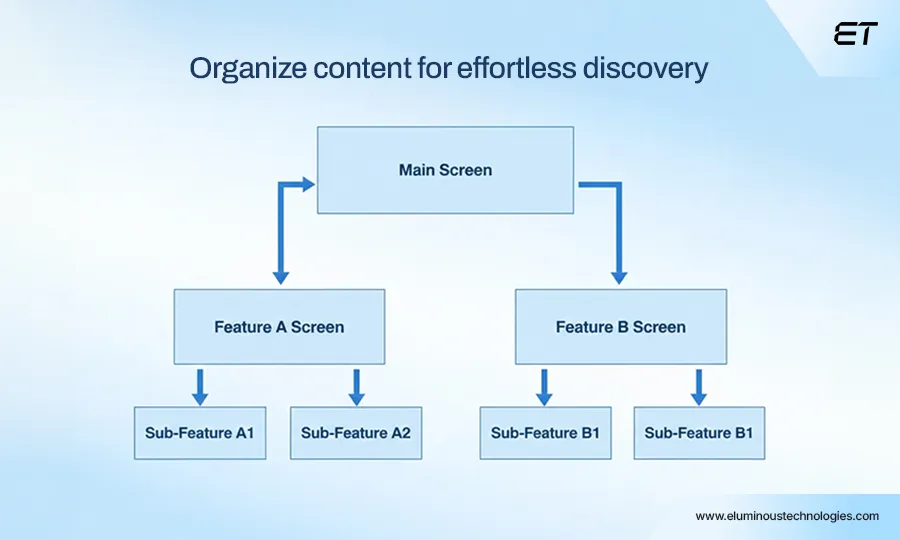
Information Architecture (IA) is the way content, features, and navigation are organized so users can find what they need without hassle. It’s the logic that underpins every flow, tap, and swipe.
Good IA is invisible when done right: users move naturally, accomplish goals effortlessly, and stay engaged.
Confusing structure kills apps faster than buggy code. Strong IA:
- Reduces user friction, speeding up task completion and boosting engagement metrics.
- Minimizes cognitive load by letting your users avoid guessing, exploring mindlessly, or abandoning flows.
- Supports scalable growth: You add features, IA ensures the app doesn’t become a cluttered maze.
- Enhances business outcomes: Smoother flows lead to higher conversion rates, lower churn, and better ROI for every feature.
The main question? How to implement foolproof IA? Here it is:
- Hierarchical mapping: Build a clear parent-child structure for screens, features, and content.
- Card sorting: Engage users (or internal stakeholders) to prioritize and logically organize content.
- Navigation design: Minimize taps, make necessary actions discoverable, and maintain consistency across screens.
- Progressive disclosure: Show only what’s necessary at the moment; avoid overwhelming users.
Now, we won’t delve deep into IA in this blog. But we’ll still give a short glimpse of how artificial intelligence impacts information architecture:
- AI can adapt menus, content hierarchies, and suggested actions in real time based on individual user behavior.
- Artificial intelligence models anticipate user intent to surface features or content before they even search.
- AI simulates multiple user journeys across millions of scenarios, flagging friction points and suggesting optimal structures.
Once you invest in IA, your users can navigate effortlessly. AI now makes it smarter, faster, and personalized, translating directly into measurable gains.
3. Interaction Design

Interaction design defines how users engage with your app. This UI UX pillar focuses on the gestures, swipes, taps, animations, and feedback loops that turn static screens into intuitive experiences.
In mobile app UI UX design, it’s the bridge between functionality and user delight.
Here’s why interaction is critical for your application:
- It reduces errors and friction, keeping users engaged and decreasing drop-offs.
- Good interactions reinforce brand trust, as responsive, predictable interactions signal professionalism.
- Smoother interactions directly increase conversion, retention, and session time.
- A well-designed interaction encourages users to explore and use your app more, maximizing ROI on development spend.
How can you implement them? Here are a few steps at a glance:
- Feedback loops: Every action should provide immediate feedback (button states, loading indicators, or subtle animations).
- Gesture optimization: Use natural mobile gestures while maintaining discoverability and consistency.
- Microinteractions: Tiny animations, confirmations, and notifications enhance engagement and make the experience feel polished.
- Flow testing: Simulate real-world tasks to identify pain points in interactions before release.
AI has supercharged interaction design. Here are several pointers backing this statement:
- Personalized flows: Apps can adapt interactions based on past user behavior, reducing friction and increasing engagement.
- Predictive microinteractions: AI anticipates user intent, automatically highlighting next steps or shortcuts.
- Rapid iteration: Machine learning analyzes millions of interaction patterns to suggest optimal gestures, animations, and feedback loops for maximum retention.
Overall, interaction design in mobile app UI/UX can be the core of user satisfaction and revenue growth. Leveraging AI here means your app can turn engagement into high ROI.
4. Visual Design
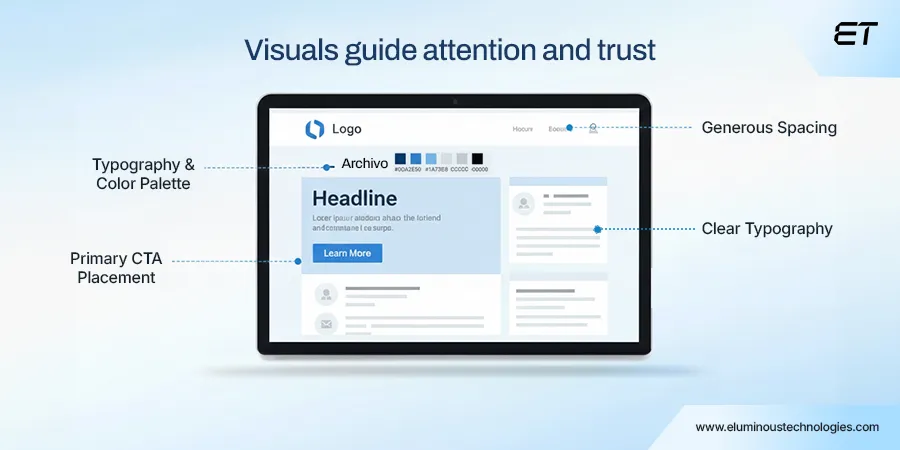
Visual design refers to how your app looks, including colors, typography, iconography, spacing, and overall aesthetic. In mobile app UI UX design, it communicates credibility, guides attention, and reinforces brand identity. Strong visuals make navigation intuitive, emphasize key actions, and instill confidence in your app.
Simply put, visual design impacts the following aspects:
- Perceived professionalism: Polished visuals signal trustworthiness and reliability.
- Engagement and retention: Clear, consistent visuals reduce cognitive load and encourage repeated use.
- Conversion rates: Thoughtful placement of CTAs, color cues, and visual hierarchy drives measurable business outcomes.
- Brand recognition: Every tap, swipe, and screen reinforces your company’s identity and values.
Now, as a design team, you can follow these tips to embed great visual design in your app:
- Consistency is key: Stick to brand guidelines across screens to build familiarity and trust.
- Hierarchy and emphasis: Use color, size, and spacing to guide users toward key actions.
- Accessible design: Ensure color contrast, readable fonts, and legible icons for all users.
- Iterative refinement: Test visual elements with real users to see what attracts attention, simplifies decisions, and drives engagement.
Yet again, AI can prove to be a catalyst in this pillar. Here’s how:
- Artificial intelligence models can adjust color schemes, layouts, and iconography based on user preferences or accessibility needs.
- Machine learning predicts which elements draw attention and optimizes visual hierarchy accordingly.
- AI speeds up icon creation, typography adjustments, and layout iterations, allowing teams to focus on strategic visual decisions rather than repetitive tasks.
Basically, you need to combine the basics and use AI to multiply the impact. The result can be great visuals that adapt and optimize in real time.
5. Performance & Accessibility

Performance is about speed, responsiveness, and reliability. It focuses on how fast screens load, transitions execute, and actions complete.
On the other hand, accessibility ensures every user, regardless of ability or device, can navigate and interact with your app effortlessly. Together, they guarantee your app delivers consistent value to all users.
Slow or inaccessible apps lose users, reputation, and revenue. Strong performance and accessibility:
- Reduce churn: Users abandon apps that lag or crash. Fast, responsive apps retain more customers.
- Expand reach: Accessibility features allow inclusion of visually impaired, deaf, and differently-abled users, opening new market segments.
- Boost engagement metrics: Faster load times and smooth interactions increase session length and feature adoption.
- Protect brand equity: An app that frustrates or excludes users reflects poorly on your company, regardless of feature set or visual polish.
Here are the best ways to maintain high performance and accessibility:
- Optimize load times: Compress assets, streamline code, and leverage caching to reduce page load time.
- Focus on responsive design: Ensure the app works flawlessly across devices, screen sizes, and operating systems.
- Accessibility audits: Incorporate features such as voice-over support, high-contrast modes, and scalable fonts.
- Monitoring & maintenance: Continuous performance tracking and regular updates prevent regressions and keep the experience frictionless.
AI has elevated performance and accessibility in interesting ways. Here are some facets to consider:
- AI anticipates user behavior to pre-load content, reducing perceived wait times.
- New AI models can dynamically adapt font sizes, contrast, and UI layouts based on individual user needs.
- Machine learning monitors crashes, lag, and bottlenecks in real time, enabling proactive fixes before users notice.
So, what’s the bottom line for you? It’s possible to scale performance and accessibility in mobile app UI UX design. The not-so-secret tool? Artificial intelligence.
Mobile App UI/UX Design: A Real-Life Example (Airbnb)
When we talk about intuitive and engaging mobile app design, Airbnb is a textbook case. Its UI/UX combines visual clarity, seamless navigation, and delightful micro-interactions.

Let’s break down this app’s main USPs. Believe us, you’ll learn a lot in this case study, just like our design team.
1. Clean, Task-Focused Layout
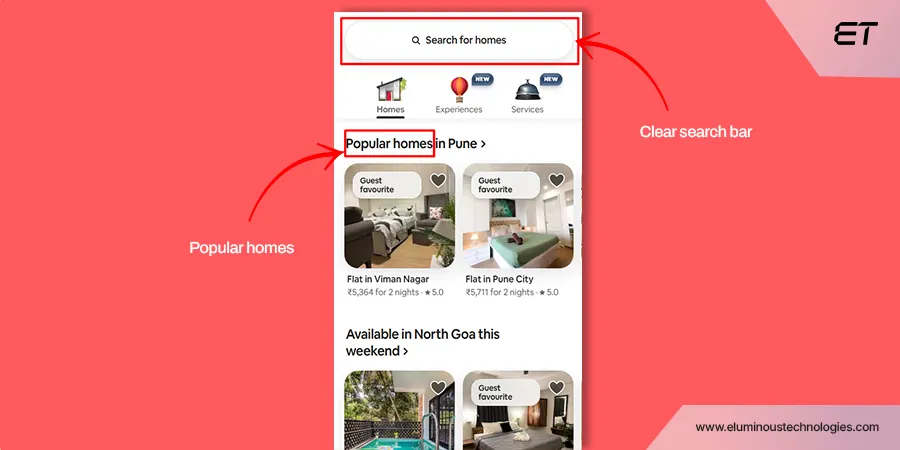
From the moment the app opens, users are presented with a clear and uncluttered interface. The home screen prioritizes:
- Search bar: Immediate access to the main task (finding a place to stay).
- Suggested destinations: Personalized recommendations based on past activity.
- Category shortcuts: ‘Experiences,’ ‘Homes,’ ‘Services,’ allowing users to dive directly into relevant content.
Why it matters: Users don’t have to hunt for actions. The interface aligns with the primary user goal: discovering and booking a stay.
2. Intuitive Navigation
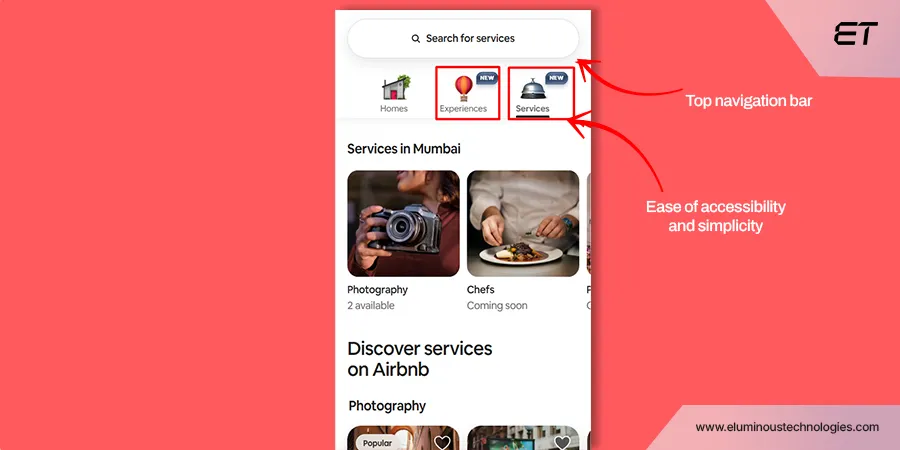
Airbnb uses a top navigation bar for the core sections:
- Home: Personalized feed.
- Experiences: Happening events and more.
- Services: Training, message, makeup, etc.
Each section is clearly labeled with icons and text, making it accessible for both first-time and returning users.
UX takeaway: The app balances discoverability and simplicity, reducing cognitive load while keeping advanced features reachable.
3. Visual Hierarchy and Card Design
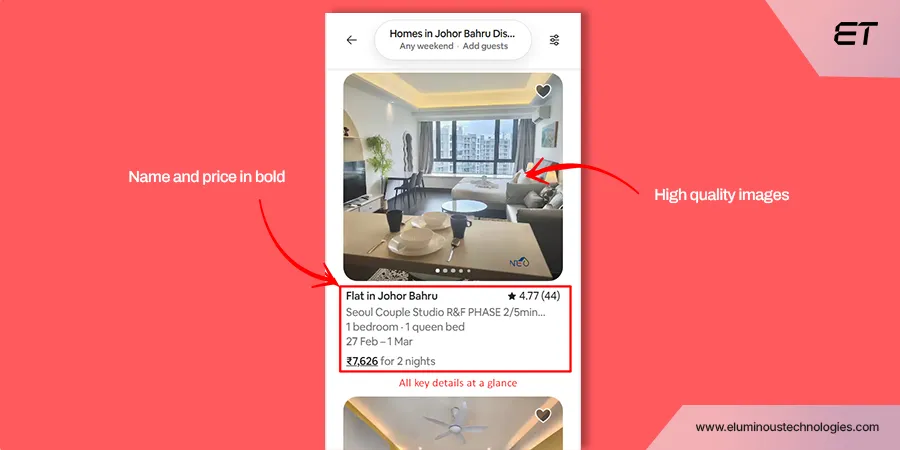
Listings use card layouts with:
- Large, high-quality images.
- Bold, readable prices and ratings.
- Key details (bedrooms, amenities) are summarized visually.
Impact: Users can quickly scan multiple options, compare listings, and make informed choices without feeling overwhelmed.
4. Micro-Interactions and Feedback
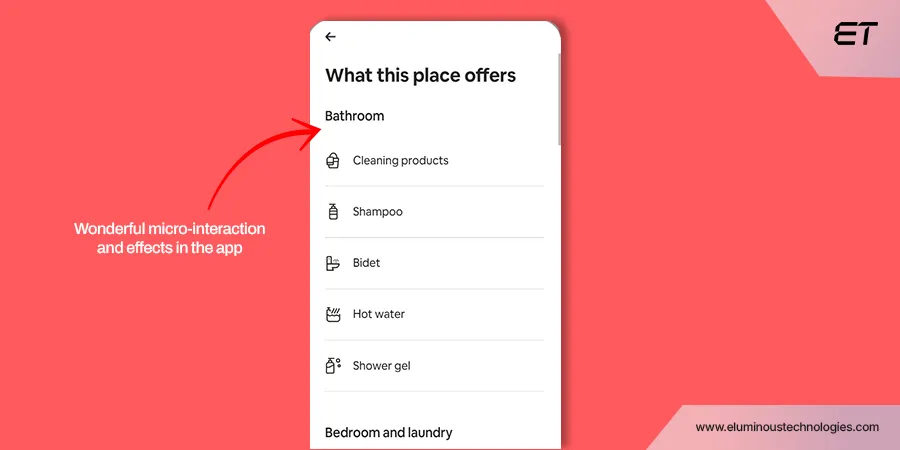
Airbnb excels in small, delightful animations that provide feedback for user actions:
- Smooth image swiping in galleries.
- Subtle hover effects for buttons.
- Loading indicators when fetching search results.
These interactions reassure users that the app is responsive and working for them.
5. Personalization and Context Awareness
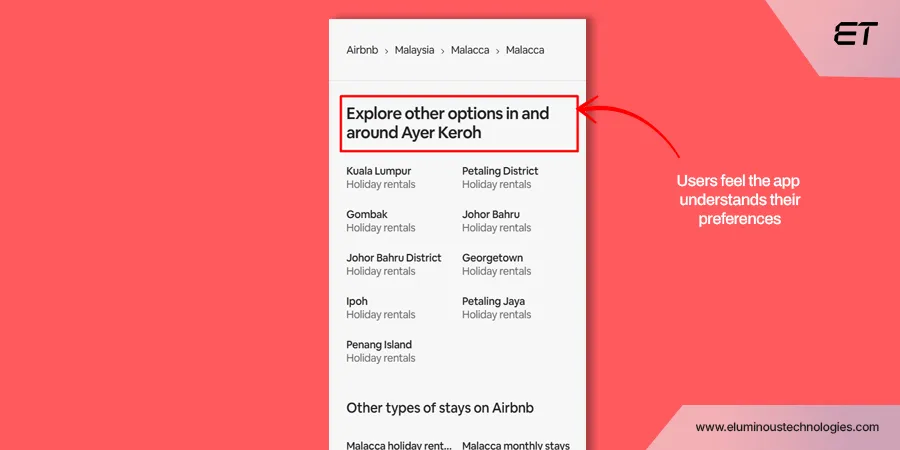
Airbnb tailors content to the user’s behavior. You can observe the following points in its mobile app UI UX design:
- Suggested destinations based on previous searches.
- Highlighted experiences in trending locations.
- Contextual prompts (e.g., “You might like this” or “Explore nearby”).
Result: Users feel the app understands their preferences, fostering trust and engagement.
6. Consistency Across Platforms
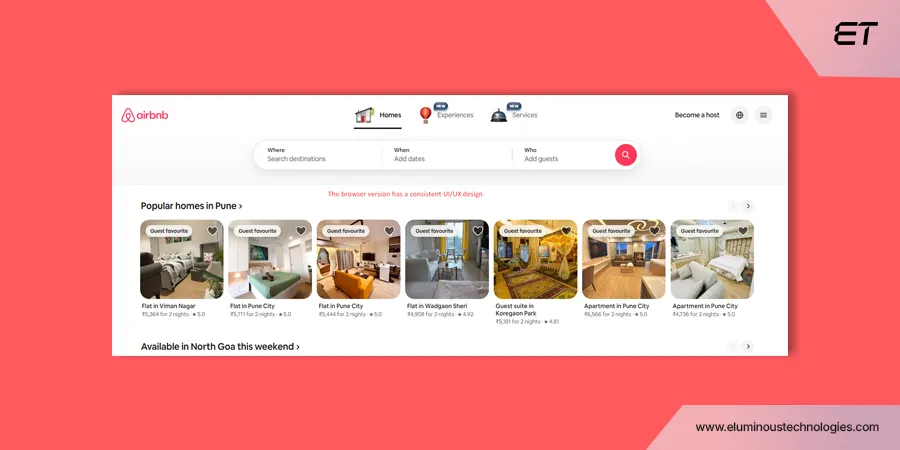
Airbnb maintains a consistent design language between mobile and desktop:
- Same color palette, typography, and iconography.
- Core functionality mirrored on the web, enabling seamless cross-platform experiences.
Airbnb’s mobile app is a masterclass in user-centric design. Every element, from layout and navigation to micro-interactions, is built to reduce friction and delight the user.
How Effective Mobile App UI UX Design Guides Users
At its core, great mobile app UI UX design is about how smoothly a user moves from intent to outcome. A well-designed app quietly guides users step by step, without making them stop and think.
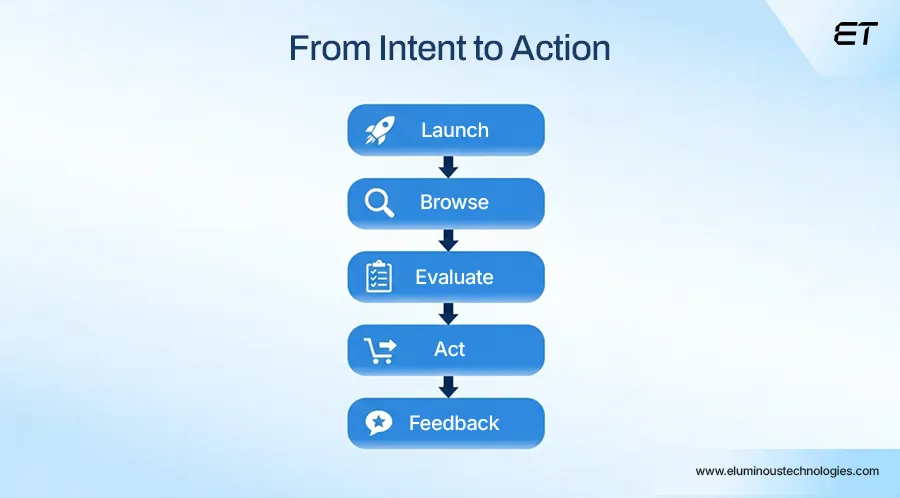
Let’s break down a typical user journey for most successful mobile apps.
Step 1: App Launch – Clear Purpose from the First Second
When users open an app, they subconsciously ask one question:
“What can I do here?”
Strong mobile app UI UX design answers this instantly by:
- Highlighting the primary action on the first screen
- Avoiding feature overload
- Using visual hierarchy to guide attention
Whether it’s searching, creating, booking, or browsing, the app should point users in the right direction without explanation.
Step 2: Input & Discovery – Helping Users Move Forward
As users interact with the app, they begin providing input like search terms, filters, selections, or preferences.
Effective mobile app UI UX design:
- Reduces typing through suggestions and defaults
- Shows relevant options at the right moment
- Avoids forcing users to make too many decisions at once
The goal here is momentum. Users should feel guided, not questioned.
Step 3: Browsing & Evaluation – Designed for Scanning
Most users don’t read content carefully. They scan.
This is where card layouts, icons, spacing, and typography become critical. Good mobile app UI UX design:
- Groups related information visually
- Highlights what matters most (price, rating, status, key actions)
- Keeps layouts consistent across screens
Users should be able to compare options quickly without opening every detail view.
Step 4: Detail View – Progressive Disclosure
When users want more information, they tap deeper.
Instead of showing everything at once, a strong mobile app UI UX design uses progressive disclosure:
- Core information appears first
- Secondary details are revealed as users scroll
- Advanced options stay accessible but out of the way
This prevents cognitive overload while still supporting informed decisions.
Step 5: Action & Feedback – No Uncertainty
Every journey ends with an action like save, submit, book, buy, or confirm.
This step succeeds when:
- Primary actions are visually dominant
- Buttons are reachable with one hand
- Feedback is immediate and clear
In an effective mobile app UI UX design, users never wonder whether their action worked. The interface tells them instantly.
Common Mobile App UI UX Design Mistakes to Avoid
Most mobile apps fail because users feel confused, slowed down, or mentally exhausted within the first few minutes. Poor mobile app UI/UX design usually stems from ignoring real user behavior and designing based on assumptions instead.
Below are the most common mistakes that silently kill usability, along with what to do instead.
| Common Mistake | What to Do Instead |
| Designing screens around features instead of user goals | Design every screen around one primary user action and remove anything that distracts from it |
| Overloading the home screen with options and promotions | Use visual hierarchy to highlight the main task and progressively reveal secondary actions |
| Forcing users to read too much text | Replace paragraphs with scannable layouts, icons, spacing, and short labels |
| Hiding important actions behind multiple taps | Keep primary actions visible and reachable, especially for one-handed use |
| Inconsistent layouts, colors, or button styles | Maintain a consistent design system to build familiarity and trust |
| Asking users to enter too much information at once | Break input into smaller steps and use smart defaults wherever possible |
| Lack of feedback after user actions | Always confirm actions with visual or motion-based feedback |
| Ignoring thumb reach and mobile ergonomics | Place key interactions within natural thumb zones |
| Prioritizing aesthetics over usability | Treat visuals as support tools, not the main attraction |
| Testing only on high-end devices | Test mobile app UI UX design across screen sizes, network speeds, and performance conditions |
Every mistake above adds friction, and friction compounds fast on mobile. When users hesitate, backtrack, or feel uncertain, they will leave.
To Sum Up
Your mobile app UI/UX design needs to be spot-on. Every unclear screen, slow interaction, or awkward flow will erode trust, engagement, and revenue. And once users drop off, no amount of post-launch marketing can bring them back at scale.
Strong mobile application UI UX influences retention, conversion, lifetime value, and brand perception. It determines whether users stay, explore, and return or uninstall without a second thought.
The winning approach is straightforward:
- Design around user intent, not internal assumptions
- Build clarity, speed, and accessibility into every interaction
- Use AI and data to refine flows continuously
- Treat UI/UX as a living system
When your design is done right, users notice how easy everything feels. And that ease turns downloads into daily usage and usage into revenue.
Design your mobile app UI UX design for retention and revenue.

The Mobile App Development Process Explained for Decision-Makers
The mobile app development process is an end-to-end framework that takes an idea from intent to a market-ready mobile application.…


Mobile App Testing Strategies: 11 Battle-Tested Approaches to Deliver Flawless Apps
Your development team just pushed the latest build to production at 3 AM. By 9 AM, your inbox is flooded…


