
 Book a Meeting

A true .NET enthusiast is aware of this framework’s capabilities. Every time a new version of this framework is released, it proves why it is the best option for creating reliable web applications.
This time .NET 8 hit the floor (release date- 14 November 2023) with new features such as full-stack Blazor, .NET MAUI, AI, simple code syntax, Leaner container image and many more. Microsoft combines the best features of .NET Core and .NET Framework in this new version.
Are you curious about the differences between .NET 8 and its predecessors?
I heard Yes! Then, keep reading till the end.
We’ll look at some exciting new features in .NET 8, transforming the .NET ecosystem and enabling developers to make more creative and reliable applications.
.NET is a cross-platform framework developed by Microsoft that is used to create a wide range of applications, including web, desktop, mobile, and cloud-based solutions. It supports multiple programming languages and provides libraries, tools, and runtime environments for efficient and standardized software development across various platforms and devices.
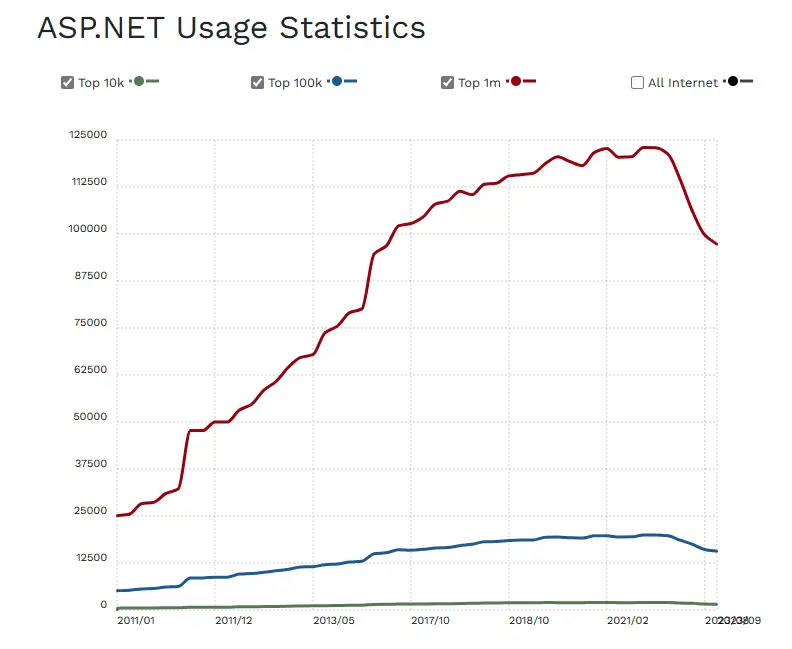
Microsoft ASP.NET is a component of the Microsoft .NET framework and the replacement for Active Server Pages (ASP) technology. (Discover how to change.NET core to.NET framework.)
View the use statistics for ASP.NET.
The .NET ecosystem has undergone numerous new developments and enhancements with the release of .NET version 8. In this new version, the long-term support (LTS) assures developers of a reliable platform and extended support.
Blazor server-side rendering, support for native AOT compilation, and streamlined output routes are just a few of the enhancements and new capabilities in this new version.
As a developer, you might wonder what enhancements and features set it apart from its predecessor. In this post, we’ll look at the .NET 8 features and improvements that make it a fantastic option for developers who want to stay on top of the game.
What’s New? Explore ALL NET .8 Features
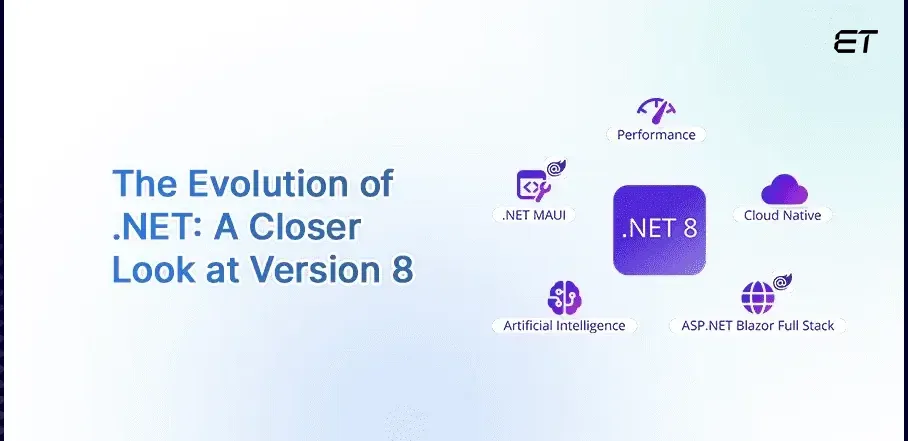
Like previous versions, the .NET Core 8 is also a powerpack framework launched by the Microsoft team to improve performance and ease down web application development processes.
1. Long-term Support (LTS) Release

A structured release pattern was introduced with the previous version of.NET. Versions with odd numbers are known as Standard Term Support (STS) releases, and they come with an 18-month support period.
In contrast to NET 7, .NET 8 is classified as a Long-term Support (LTS) release, meaning Microsoft will continue to provide updates and extended support for it (up to three years). LTS releases are designed for stability and continuity, making them suitable for enterprise applications requiring long-term maintenance.
Users can rely on LTS versions for critical applications, as they receive security patches, bug fixes, and updates beyond the standard support cycle. The extended support ensures that businesses can maintain the stability and security of their applications over an extended duration without being forced into frequent upgrades, providing a reliable foundation for sustained software development and deployment.
2. Blazor Update

Blazor is a web framework within the .NET ecosystem that allows dedicated .NET developers to build interactive web applications using C# and .NET instead of traditional JavaScript. It enables the creation of single-page applications with components running on both the server and client sides, providing a unified development experience for web development.
Blazor has undergone numerous upgrades and improvements in this latest version. These are the important ones.
- With Blazor components, server-side rendering (SSR) now enables content updates to be streamed through the response stream. This feature considerably enhances the user experience.
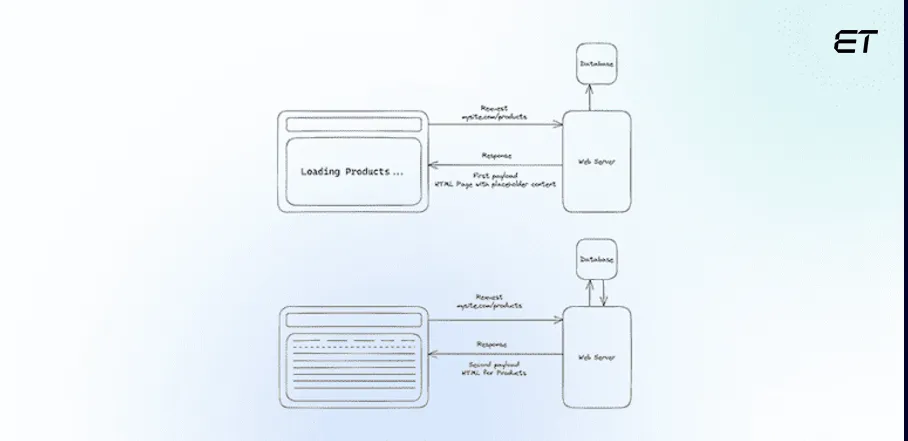
- Blazor SSR now has a more efficient way of handling form posts, which is one of its new features. This enhancement makes the creation of web forms and the handling of submissions easier.
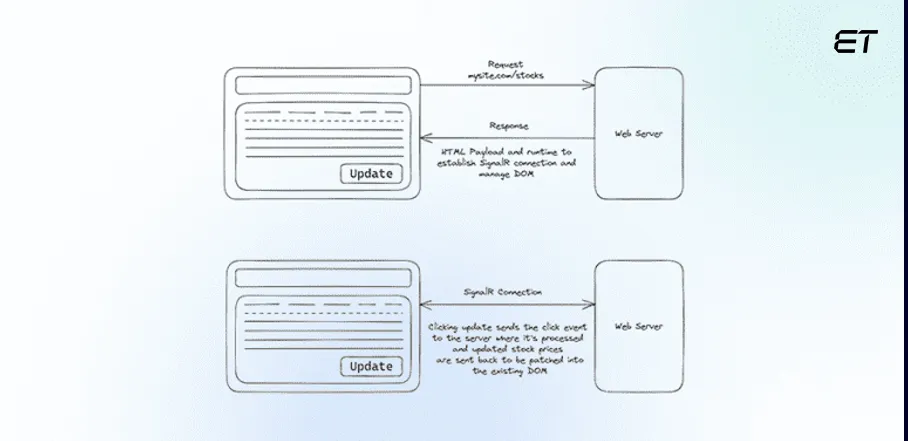
- Blazor supports client-side routing in .NET 8 Preview 4, which enables standard URL fragments to navigate to particular HTML elements on a page. This means that when the URL fragment matches the element identifier, Blazor will automatically scroll to the HTML element to which you have assigned an identifier using the {id} attribute. This function provides a smooth and easy way to go between different parts of a webpage.
With all these changes, full-stack web UI is the most significant shift in the Blazor ecosystem and is expected to establish Blazor as the “go-to UI framework” for modern .NET web applications.
3. System.Text.Json Serialization
SystemText is a JSON serialization library in .NET that offers high-performance and customizable JSON serialization and deserialization. Introduced as part of .NET Core, it’s now a fundamental component in .NET version 8.
System.Text.Json has improved significantly, especially regarding dependability and performance when utilized in Native AOT apps with ASP.NET Core. These improvements include:
-
Built-in Support for Additional Types
The following additional types are supported by the serializer by default.
Memory and ReadOnlyMemory<T> values. byte values are serialized to Base64 strings and other types to JSON arrays.
Find the best tools to enhance your custom .NET development processes.
JsonSerializer.Serialize<ReadOnlyMemory<byte>>(new byte[] { 1, 2, 3 }); // "AQID"
JsonSerializer.Serialize<Memory<int>>(new int[] { 1, 2, 3 }); // [1,2,3]
Half, Int128, and UInt128 numeric types.
Console.WriteLine(JsonSerializer.Serialize( [ Half.MaxValue, Int128.MaxValue,
UInt128.MaxValue ] )); // [65500,170141183460469231731687303715884105727,340282366920938463463374607431768211455]
-
Chain Source Generators
A new TypeInfoResolverChain property is added to the JsonSerializerOptions class to supplement the existing TypeInfoResolver property. Contract customization uses these properties to chain source generators. Thanks to the addition of this new property, you can now add chained components after the fact rather than having to specify them all at once at the call site. You can also remove components from the chain or examine it with TypeInfoResolverChain.
-
Interface hierarchies
Support for serializing attributes from interface hierarchies has been added in this latest version of .NET.
An example of serializing properties from both the immediately implemented interface and its base interface is given in the code below.
IDerived value = new DerivedImplement { Base = 0, Derived = 1 }; JsonSerializer.Serialize(value);
// {"Base":0,"Derived":1}
public interface IBase
}
public int Base { get; set; }
}
public interface IDerived : IBase
}
public int Derived { get; set; }
}
public class DerivedImplement : IDerived
{
public int Base { get; set; }
public int Derived { get; set; }
}
-
Disable reflection-based default
In this new version, you can now disable the reflection-based serializer by default. This disablement is helpful, especially in reduced and Native AOT programs, to prevent unintentionally rooting reflection components that aren’t even in use.
See Disable reflection defaults for further details.
-
Naming Policies
JsonNamingPolicy contains new naming rules for property name conversions to snake_case (with an underscore) and kebab-case (with a hyphen). Utilize these policies in a manner consistent with the JsonNamingPolicy.CamelCase policy:
 var options = new JsonSerializerOptions
{
PropertyNamingPolicy = JsonNamingPolicy.SnakeCaseLower
};
JsonSerializer.Serialize(new { PropertyName = "value" }, options);
// { "property_name" : "value" }
-
Freeze a JsonSerializerOptions instance
You may now manage when a JsonSerializerOptions instance freezes with the following different methods:
JsonSerializerOptions.MakeReadOnly()
JsonSerializerOptions.MakeReadOnly(Boolean)
You may determine whether the option instance is frozen by using the new IsReadOnly attribute.
4. Extended AI and ML Support

Machine learning and artificial intelligence are essential technologies in today’s software environment. Microsoft has improved AI and ML support with .NET 8, which makes it simpler for developers to easily include complex algorithms and models in their apps.
AI and ML support for .NET developers includes enhanced data analysis, predictive modeling, and automation. ML frameworks like ML.NET empower developers to integrate machine learning into applications. AI tools assist in code analysis, debugging, and automating repetitive tasks, improving overall productivity and enabling the creation of more intelligent and data-driven applications.
5. Improved Diagnostics and Observability

In .NET development, improved diagnostics and observability refer to enhanced tools and features for monitoring and understanding the behavior of applications. These .NET 8 features include advanced logging, profiling, and tracing capabilities.
Dedicated .NET developers can leverage these tools to identify performance bottlenecks, troubleshoot issues, and gain insights into application behavior, leading to more effective debugging and optimization processes. This enhanced observability is crucial for building robust and maintainable .NET applications.
6. New Data Validation Attributes

The DataAnnotations namespace is intended primarily for cloud-native service validation. Form fields and other user data are the main uses for the current DataAnnotations validators. Like configuration options, the new attributes are intended to validate data—not user-entered data. In addition to the new attributes, new properties were added to the RequiredAttribute and RangeAttribute types.
In .NET version 8, RequiredAttribute.DisallowAllDefaultValues prevents properties with default values from passing validation. Example:
[Required(DisallowAllDefaultValues = true)]
public int Age { get; set; } // Validation fails for default int value (0).
In .NET version 8, RangeAttribute.MinimumIsExclusive and RangeAttribute.MaximumIsExclusive exclude the specified values from the valid range. Example:
[Range(1, 10, MinimumIsExclusive = true)]
public int ExclusiveMinValue { get; set; } // Valid if greater than 1.

[Range(1, 10, MaximumIsExclusive = true)]
public int ExclusiveMaxValue { get; set; } // Valid if less than 10.
7. Native AOT Support

When an application is published as a native AOT, it can be published as a standalone version that bundles all its dependencies into a single file and eliminates the need for a separate runtime. This feature was first introduced in .NET 7.
The following enhancements to Native AOT publishing are brought in .NET 8:
-
- Expands macOS support for the Arm64 and x64 architectures.
- Allows you to choose whether you want optimization for speed or size. By default, the compiler considers the application’s size and opts to produce quick code. Nevertheless, you can optimize specifically for one or the other using the MSBuild property. Refer to Optimize AOT deployments for further details.
- Minimizes Native AOT application sizes by up to 50% on Linux. The size of a “Hello World” application published with Native AOT on .NET 7 compared to .NET Core 8 is displayed in the following table:
| Operating Systems | .NET 7 | .NET 8 |
| Linux x64 (with -p:StripSymbols=true) | 3.76 MB | 1.84 MB |
| Windows x64 | 2.85MB | 1.77MB |
8. Performance Improvements

Microsoft team hits a new .NET version to increase performance. Similarly, making sure your apps are quick, effective, and seamless across various platforms is a top priority of the .NET 8 framework.
Let’s examine a few of the major performance enhancements brought about by this new version.
- Microsoft engineers have worked hard to optimize the .NET runtime, consuming fewer resources and improving overall performance.
- Cutting down on application startup times was one of the main objectives. Faster application launches will enhance end users’ overall experience due to this .NET optimization.
- One of the leading .NET 8 features is a significant improvement in support for parallelism, which allows dedicated .NET developers to write more scalable and efficient code to take full advantage of modern multi-core architectures.
- .NET version 8’s profiling tools provide a thorough overview of an application’s performance, making it simple for developers to find and fix performance problems.
Ready for a faster, more efficient .NET web app? Explore proven performance hacks to elevate your development.
Furthermore, enhanced dynamic profile-guided optimization (PGO) is enabled by default. Dynamic PGO improves performance by roughly 15% on average. Of the tests in the benchmark suite (about 4600), 23% showed improvements in performance of 20% or higher.
In addition to developers, these improvements satisfy end users, who demand top-notch functionality from modern apps. In addition to developers, these improvements satisfy end users, who demand top-notch functionality from modern apps.
9. Implementation of ASP.NET Core metrics

Using ASP.NET Core metrics is one of the most useful .NET 8 features. Metrics are crucial for producing alerts and keeping an eye on the functionality of your application. The improved metrics features will make it easier for developers to build and manage performant, high-quality applications.
Compared to current event counters, the Metrics API provides the following improvements:
- New Measurement Types: Metrics introduces new measurement types, including gauges, histograms, and counters.
- Strong reporting with Multi-Dimensional Values: Multi-dimensional values are supported, providing more intricate and complex reporting possible.
- Integration with the Cloud-Native Ecosystem: Metrics guarantees a smooth and seamless integration with the wider cloud-native ecosystem through its adherence to OpenTelemetry standards.
10. API Authoring extended

The expanded API authoring capabilities enable a more thorough and effective development process. Let’s see the changes in API authoring in the new version.
-
API Project Template Consists of .http File
With the addition of a .http file to the API project template, developers can now use the new HTTP editor in Visual Studio to send requests directly to defined endpoints within the application. With this simplified method, developers can test and refine their APIs more quickly, resulting in a more effective development process.
-
Increased Form Binding Support in Minimal APIs
This release supports form binding in minimal APIs across a wide range. OpenAPI metadata, IFormCollection, IFormFile, and IFormFileCollection are all included in this advanced support. By utilizing these advancements, developers can build more resilient and adaptable APIs that meet a range of needs.
Thanks to these API authoring updates in .NET Core 8, developers using ASP.NET Core will have a more robust and seamless experience.
Building Interactive UIs with Angular and .NET 8
.NET 8 can work with modern frontend frameworks such as Angular to build responsive, interactive web applications. While Angular handles the client-side user interface, ASP.NET Core provides the backend APIs and services that power the application.
A common UI pattern in Angular applications is an expandable panel, which allows users to show or hide additional information without navigating to another page. Expandable panels can be useful for FAQs, product specifications, dashboards, settings, and other interfaces where presenting all information at once could make the page difficult to navigate.
You can connect an Angular expandable panel to a .NET 8 application through ASP.NET Core APIs. For example, an Angular frontend can request product or customer data from a .NET 8 Web API and display the details inside an expandable section when the user interacts with it.
This combination provides a flexible architecture: Angular manages the interactive presentation layer, while .NET 8 handles business logic, APIs, authentication, data access, and other backend services.
For applications that need a highly interactive frontend alongside a scalable backend, combining Angular with .NET 8 offers a practical approach to modern web application development.
An Interesting Take on .NET 8 Upgrade
During the research on this topic, we delved deeper to understand the impact of .NET 8 on various projects. We found a Reddit thread that gave insights to several handy discussions.
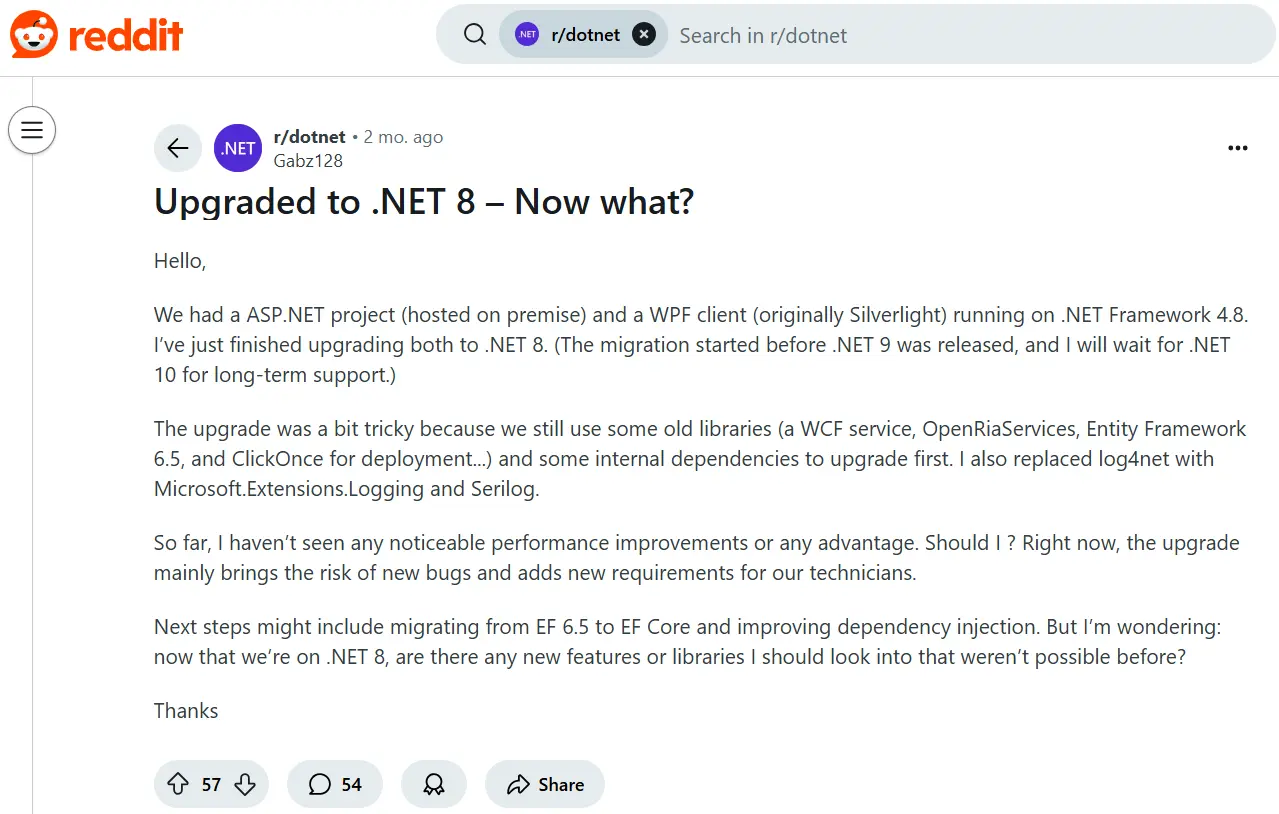
Here are some points we found useful (Information courtesy r/dotnet):
- With .NET 8, you can host on Linux and in containers
- The migration path is sorted out and enhanced
- .NET 8’s new C# syntax is great
- The support is noteworthy
All these points were observations from Redditors on the subreddit r/dotnet. You can read the discussion here.
End Note
As the .NET ecosystem evolves continuously, developers must stay current with the newest developments and best practices.
Although .NET 7 and .NET 8 both provide excellent features and improvements. NET Core 8 is a more compelling option for developers who want to ensure their applications are future-proof. This new version offers a solid basis for the development of modern applications.
The extensive feature set of .NET 8 Preview 4 indicates the Microsoft team’s dedication to providing a necessary framework for robust and scalable web application development.
As ASP.NET Core prepares the way for the next generation of web applications, embrace these updates with the assistance of a top .NET web application development company to investigate new opportunities. Also, keep an eye out for upcoming releases.
Speak with our .NET development support team if you’re still unsure whether switching from.NET 7 to.NET 8 is the right course of action!
Ready to implement the latest .NET 8 features in your project? Let’s chat and get you ahead of the curve!
Frequently Asked Questions
What is the difference between .NET 7 and .NET 8?
.NET 8 is more proficient and advanced than .NET 7. It offers improved performance, better integration, and new feature additions. Read this blog to discover all the latest features added to this new version.
What is in .NET Core 8?
ASP.NET Core has substantial new features and modifications in this latest version. Along with upgrades for AOT, Identity, SignalR, Metrics, and many other areas, the most noteworthy improvements for this version of ASP.NET Core are linked to performance and Blazor.
Why upgrade to .NET 8?
You should upgrade to this most recent version not only for technical change but to ensure that your apps are future-proof. With this change, modern development features are accessible, along with enhanced performance and cross-platform compatibility.
How can I create a radio button using JavaScript?
You can create and control radio buttons using HTML and JavaScript. HTML defines the radio button with the <input type=”radio”> element, while JavaScript can detect the selected option, change its state, or respond to user interactions.
For example:
<input type=”radio” name=”framework” value=”.NET” id=”dotnet”>
<label for=”dotnet”>.NET</label>
JavaScript can then access the selected radio button using standard DOM methods and use its value in application logic.
Can JavaScript be used with .NET 8 applications?
Yes. JavaScript can be used alongside .NET 8 and ASP.NET Core applications for client-side interactions and dynamic user interfaces. ASP.NET Core can handle backend functionality and APIs, while JavaScript or frontend frameworks such as Angular can manage browser interactions.
The two technologies can therefore work together without requiring JavaScript to replace .NET 8. The appropriate approach depends on the application’s architecture and frontend requirements.


.NET 10 Features and Enhancements: What’s New and Should You Upgrade?
Summary: .NET 10 is the latest LTS release of Microsoft’s .NET platform. It brings significant updates across the runtime, SDK,…


A Guide to ERP Integration: Why It’s Essential for Business Efficiency
Summary: Most organizations think of ERP Integration as interconnected systems for efficiency. It has been true for most enterprise efficiency…


