
 Book a Meeting
.NET 10 Features and Enhancements: What’s New and Should You Upgrade?

.NET 10 is the latest LTS release of Microsoft’s .NET platform.
It brings significant updates across the runtime, SDK, C# 14, ASP.NET Core 10, EF Core 10, and libraries. These include JIT optimizations, new stack allocation capabilities, NativeAOT improvements, enhanced developer tooling, API updates, and more.
Migrating to .NET 10 requires careful planning to assess application compatibility, dependencies, and potential changes.
This article covers the key features and enhancements in .NET 10 and helps you assess your current application landscape to plan your next steps.
.NET 10 is here, but should your business upgrade right away?
A new .NET release can bring better performance, improved security, new capabilities, and longer-term support. But upgrading an existing application isn’t as simple as installing the latest version.
For business leaders, the real questions are different: Will the upgrade improve our application? What will migration cost? How much disruption could it cause? And is there a good reason to upgrade now rather than later?
.NET 10 is Microsoft’s latest LTS release, giving organizations a longer support window to plan and run their applications. At the same time, .NET 9 is approaching the end of its Standard Term Support period in September 2026, making the upgrade decision increasingly relevant for businesses still running it.
In this guide, we’ll look at what’s new in .NET 10, what these changes could mean for your applications, and the key factors to consider before planning a migration.
What’s New in .NET 10
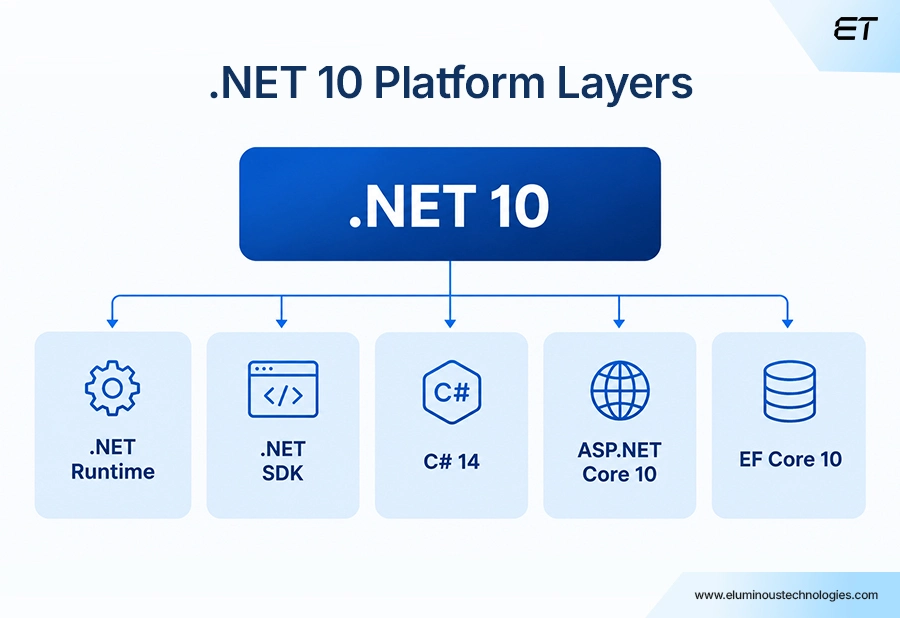
.NET 10 is Microsoft’s latest major release of its free, open-source .NET platform, introducing improvements across application performance, development tools, web development, data access, and AI-related capabilities.
The release includes updates across several parts of the .NET ecosystem:
- .NET 10 Runtime: Improvements to memory management, JIT compilation, NativeAOT, and hardware support
- .NET 10 SDK: Updates to testing, CLI tools, containers, and file-based applications
- C# 14: New language features available with the .NET 10 SDK
- EF Core 10: Enhancements for data access, vector search, JSON, query filters, and Azure Cosmos DB
- ASP.NET Core 10: Updates to validation, diagnostics, OpenAPI, Blazor, and Identity
.NET 10 was officially released on November 11, 2025, following the annual .NET release cycle.
More importantly for businesses, .NET 10 is a Long-Term Support (LTS) release. It provides three years of support, giving organizations a longer window to maintain their applications and plan future upgrades.
However, upgrading to an LTS release does not automatically mean every application needs to adopt every new capability. The right approach depends on the technologies your application currently uses, its business requirements, and the potential benefits of upgrading.
So, what has actually changed in .NET 10, and how could those changes affect your applications? Let’s start with the .NET 10 Runtime.
.NET 10 Runtime: What’s New?
The runtime is the part of .NET that executes your application. It manages memory, code execution, garbage collection, and interaction with the operating system. Many of the improvements in .NET 10 are designed to reduce overhead and improve application performance.
Because many of these runtime changes happen behind the scenes, businesses don’t necessarily need major changes to their existing deployment processes to benefit.
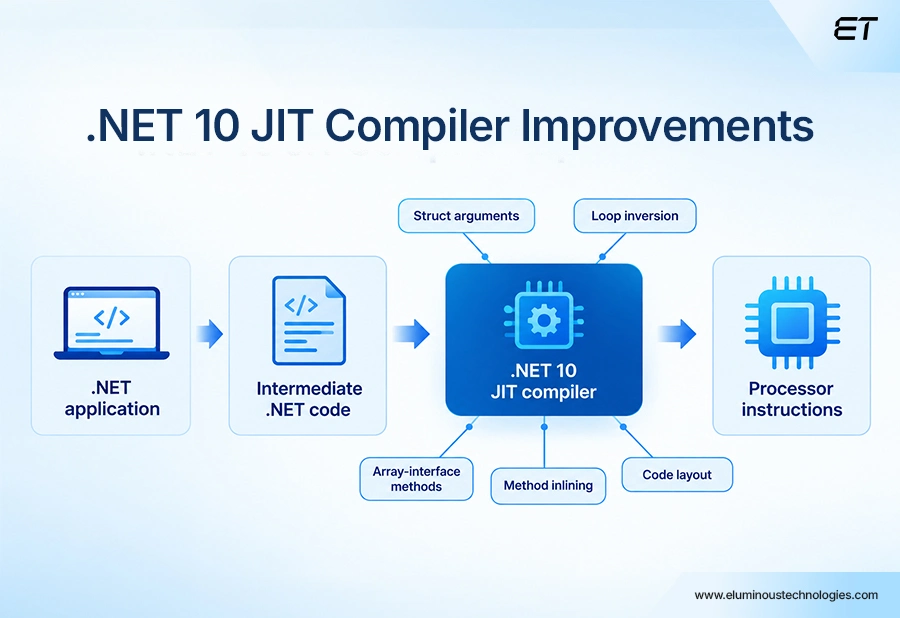
One key area of improvement is compilation. With .NET 10, Microsoft introduced several optimizations to the JIT (Just-in-Time) compiler that can help applications execute code more efficiently.
Minimum Overheads through JIT Improvements
.NET 10 update highlights how JIT operates across commonly occurring development processes:
Method Inlining
.NET 10 improves the JIT compiler’s ability to identify and optimize frequently used methods. It can revisit additional inlining opportunities after earlier optimizations and make better use of runtime profile data.
For example, if a method is called frequently, the JIT can prioritize it for optimization. This can reduce overhead from repeated method calls and improve execution efficiency on frequently used code paths.
The benefit is primarily at runtime, so developers don’t need to change their application’s business logic to take advantage of it.
Hot-Code Layout
.NET 10 also improves how the JIT organizes frequently executed sections of code. By keeping commonly used code paths closer together, the runtime can reduce unnecessary jumps during execution.
In practice, it can look like this:
A business has two payment paths:
- A common path for validating and approving payments
- An exception path for errors and rejections
Because the approval path is used more frequently, the JIT can organize the related code more efficiently. This can help reduce execution overhead on the application’s hot paths.
The optimization happens at the runtime level and doesn’t change your APIs, business rules, or application logic.
More Efficient Memory Allocation

.NET 10 expands the JIT compiler’s ability to identify objects that remain within a method and allocate them on the stack instead of the managed heap.
This can reduce the amount of work required by the garbage collector and potentially improve application performance, particularly in workloads that create many short-lived objects.
The optimization happens automatically when the JIT determines that an object doesn’t need to remain accessible beyond its method. Developers don’t need to manage these allocations manually. However, the JIT doesn’t guarantee stack allocation for every object. The JIT evaluates the code and object lifetime before deciding whether the optimization is appropriate.
C# 14 Features
C# 14 is the latest version of the C# language and is supported by .NET 10. You don’t need to migrate to .NET 10 simply to continue using C#, but upgrading gives development teams access to the language’s latest features.
For businesses, these changes mainly improve developer productivity, clean up code, and reduce repetition. Some features can also help improve performance in applications that handle large amounts of data or memory-intensive workloads.
Some of the more practical C# 14 improvements include:
Field-Backed Properties
C# 14 introduces the field keyword, allowing developers to work with a property’s underlying storage without declaring a separate backing field. This can reduce boilerplate when adding validation, normalization, or other property logic.
Null-Conditional Assignment
The null-conditional operators ?. and ?[ ] can now be used on the left side of an assignment. This reduces repetitive null checks and can make certain parts of the code easier to read and maintain.
Implicit Span Conversions
C# 14 expands conversions involving Span<T>, ReadOnlySpan<T>, and arrays. This can simplify code that works with memory-efficient data processing, such as parsers and serializers.
Other C# 14 improvements include extension members, file-based application directives, and additional language syntax enhancements. Their relevance will depend on the application’s architecture and the development team’s needs.
ASP.NET Core 10: Web and API Improvements
For businesses running .NET-based websites, APIs, or web applications, ASP.NET Core 10 brings improvements across API development, web UI, validation, and authentication.
Better APIs and Validation
ASP.NET Core 10 adds built-in API validation and expands OpenAPI support. These improvements can make it easier for development teams to validate incoming data, document APIs, and build services that are easier to maintain and integrate.
The release also expands support for Server-Sent Events, helping applications deliver real-time updates without constant polling.
Blazor and Web UI Improvements
Blazor receives several updates around asset handling, JavaScript interoperability, diagnostics, and form validation. These changes can help teams build and maintain interactive web applications with less manual configuration.
Authentication and Security
ASP.NET Core 10 also improves authentication and identity capabilities, including support for passkeys through the Web Authentication API and better visibility into authentication activity through updated metrics.
The relevance of these improvements depends on the application type, architecture, and authentication model used. Organizations should evaluate the specific changes against their existing ASP.NET Core applications before planning an upgrade.
EF Core 10 and Data Access
EF Core 10 is the LTS version of Microsoft’s object-relational mapping framework for .NET 10. It introduces several improvements for applications that rely on databases and data-driven functionality.
One notable addition is named query filters, which allow applications to apply multiple filters to the same entity and disable them independently. This can help with scenarios such as soft deletion and multi-tenant applications. However, query filters should not replace proper authorization checks.
EF Core 10 also expands support for vector data and similarity search, including support for vector functions in Azure SQL Database and SQL Server 2025. This may matter for applications that use AI-powered search and retrieval.
The release also improves JSON data support and adds full-text and hybrid search capabilities for Azure Cosmos DB, giving teams more options for applications that combine traditional data with modern search and AI workloads.
For teams planning a migration, review database compatibility and migration behavior carefully. Existing applications may require changes depending on their database provider, schema, and current EF Core implementation
Security and Library Improvements
.NET 10 also updates foundational libraries, including cryptography, networking, serialization, diagnostics, globalization, and WebSockets.
For businesses, the key point is that these updates can improve capabilities for applications that rely on these APIs, but they don’t automatically make an existing application more secure. Teams should evaluate their applications’ security requirements and review relevant dependencies and configurations as part of the upgrade process.
In particular, organizations should avoid treating new security APIs as a substitute for broader application security practices or assuming that upgrading alone makes an application post-quantum secure.
How Should You Plan the .NET 10 Upgrade?
Upgrading to .NET 10 doesn’t mean rebuilding your application from scratch. However, organizations should migrate in stages to identify compatibility issues, assess risks, and validate the application before moving it into production.
A practical upgrade process can include:
1. Taking stock of your target framework, packages, current database providers, operating system, dependencies, deployment model, and test coverage.
2. Breaking your dependencies into groups: runtime, SDK, ASP.NET Core, EF Core, and anything workload-specific so that you can tackle each one on its own terms.
3. Checking Microsoft’s compatibility and breaking changes documentation so you can prepare for changes before moving from the previous .NET version.
4. Upgrading through branches and resolving warnings or dependency conflicts so the original code stays safe.
5. Assessing database behavior, UIs, APIs, background jobs, and authentication.
6. Benchmarking individual processes including startup time, memory usage, GC, container behavior, and throughput.
7. Rolling out the deployment plan as you gain confidence, with a rollback strategy in place.
Review Microsoft’s tooling recommendations before starting the migration. The .NET Upgrade Assistant is deprecated, so teams should follow Microsoft’s current guidance for supported modernization and upgrade workflows.
In Essence
.NET 10 is Microsoft’s latest LTS release, bringing improvements across performance, developer tooling, web development, data access, and application capabilities.
However, upgrading isn’t about adopting every new feature. The right approach is to identify which changes matter for your applications, review compatibility and dependencies, and assess the potential impact on performance, security, infrastructure, and development workflows.
For organizations considering a move from .NET 8 or .NET 9, the three-year LTS support window gives you time to plan and execute the migration in stages rather than treating it as a rushed upgrade.
Start by assessing your current application environment, identifying compatibility gaps, and prioritizing changes that deliver meaningful business value. From there, a phased migration and the right technical expertise can reduce risk and make the transition to .NET 10 more predictable.
Have Questions About .NET 10 Migration?


A Guide to ERP Integration: Why It’s Essential for Business Efficiency
Summary: Most organizations think of ERP Integration as interconnected systems for efficiency. It has been true for most enterprise efficiency…


ServiceNow ROI: Why Process Design Matters More Than Platform Features
Summary: ServiceNow ROI ServiceNow is one of the most powerful workflow platforms available to enterprises today. Yet many organizations struggle…


