
 Book a Meeting
Web Application Architecture for Enterprises: Components, Types, and Best Practices


Web application architecture is the structural blueprint that defines how a web application is designed, built, deployed, and scaled. It governs how users, interfaces, backend services, infrastructure, and data systems work together to deliver seamless digital experiences. When done right, it enables speed, resilience, and growth. When done poorly, it becomes a silent risk embedded deep within the business.
That risk became visible earlier this year when a major cloud provider experienced a multi-region slowdown lasting less than half an hour. Despite the short duration, the impact on global enterprises was severe.
Payment gateways lagged, logistics portals froze, customer apps stalled, and IT teams scrambled as the downtime translated to an estimated $1.7 billion in lost productivity and delayed transactions.
It was a sharp reminder of something every CIO and CTO already knows but sometimes underestimates: your Web Application Architecture is not just a technical foundation, it is the backbone of your business.
Gartner’s latest findings highlight a simple truth: most enterprise outages don’t come from cyberattacks or vendors; they start inside, in architectures that weren’t built to scale or handle sudden demand.
And when those systems fail, high-transaction businesses feel the impact immediately, from disrupted operations to lost customer trust. Whether your teams are shipping new features, expanding to new markets, onboarding large customer volumes, or navigating sudden traffic spikes, it is your web application architecture that ultimately determines whether everything runs smoothly or falls apart.
That’s why enterprises are rethinking how they design and evolve their systems. They are asking questions like: Can our platform handle a 10x spike during peak season? Are our microservices truly independent?
Understanding Web Application Architecture In Enterprise
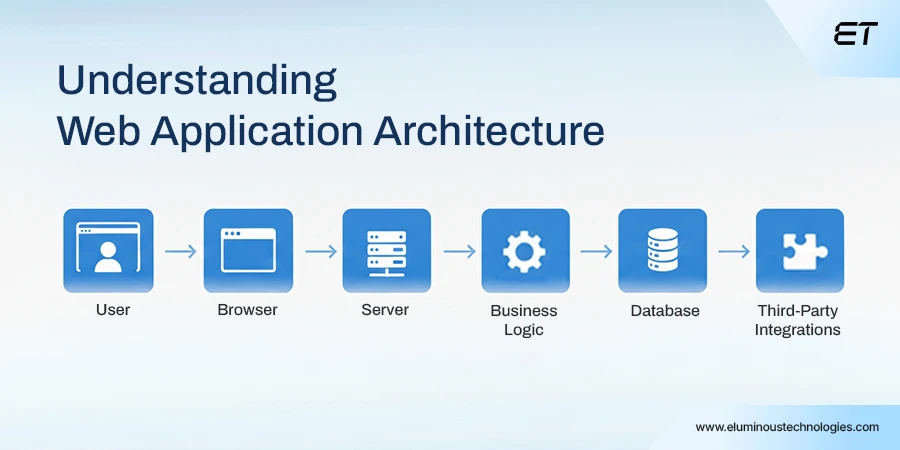
Web Application Architecture is often described as a “structural blueprint” for how software components interact, communicate, and evolve. But for large enterprises, this definition barely scratches the surface. Their digital ecosystems are expansive, multi-layered, and constantly adapting to new business demands.
In reality, architecture is not just a diagram; it is an enterprise-grade foundation. Instead of being static, Web Application Architecture acts as the dynamic scaffold that shapes how applications behave.
It also depicts how much technical debt accumulates, how fast teams can deploy new features, and how resilient the business remains during unexpected traffic surges or infrastructure failures.
At its core, Web Application Architecture covers everything that enables a web application to receive requests, process them effectively, respond quickly, and remain secure at every step. This includes:
- The user interface customers engage with
- The server-side logic that powers business rules
- The databases storing transactional and behavioral data
- The APIs and integrations extend capabilities
- The global delivery mechanisms ensure consistent, fast performance.
All these moving parts work together to determine how well an organization can scale when demand spikes, and how it recovers from disruptions.
In other words, great architecture becomes a competitive advantage.
As Amazon’s engineering principle goes: “Everything fails all the time—architecture is how you get back up.”
A strategic approach to architecture transforms it from a technical backbone into a true business enabler, strengthening customer experience, improving operational reliability, ensuring compliance, and accelerating revenue.
Learn how to pick the perfect tech stack that complements a strong web application architecture.
Web Application Architecture Components
Enterprise web applications are composed of multiple interconnected components, each responsible for a specific function within the system. These components work together to ensure performance, scalability, security, and a seamless user experience. Broadly, enterprise systems can be categorized into Structural Components and User Interface (UI) Components.
Structural Components
Structural components form the technical backbone of a web application. They define how data flows, how business logic is executed, and how systems communicate internally and externally.
The Client (Frontend)
The client, or frontend, represents the application’s presentation layer and runs entirely within the user’s web browser. It is typically built using HTML, CSS, and JavaScript, along with modern frameworks such as React,
Angular, or Vue.
Beyond visual presentation, the frontend is responsible for handling user interactions, form submissions, validations, state management, and API communication. In enterprise applications, the frontend often integrates advanced features such as role-based UI rendering, localization, accessibility compliance, and responsive design to support multiple devices and user types.
The Server (Backend)
The server, or backend, powers the application’s core logic. It is commonly developed using frameworks and languages such as Java (Spring Boot), Python (Django or FastAPI), or Node.js.
This layer processes business rules, manages authentication and authorization, enforces security policies, validates requests, and orchestrates communication between internal services and external systems. In enterprise environments, backend architectures often follow microservices, service-oriented architecture (SOA), or event-driven models to improve scalability, fault isolation, and deployment flexibility.
The Database
The database layer is responsible for storing, retrieving, and managing persistent application data. Depending on the use case, enterprise systems may use relational databases such as MySQL or PostgreSQL, NoSQL databases like MongoDB, or distributed data stores such as Cassandra.
Beyond simple storage, databases support transaction management, indexing, replication, backup, and data consistency. Large-scale applications often combine multiple database types to optimize performance, support analytics, and handle high-volume transactional workloads.
User Interface (UI) Components
UI components sit within the presentation layer and focus on how users interact with the system. These components translate complex backend processes into intuitive, usable experiences.
UI components include layouts, dashboards, navigation menus, notifications, forms, charts, and interactive elements. In enterprise applications, they are designed to support high information density while remaining user-friendly. Dashboards often provide real-time data visualizations, role-specific views, and actionable insights tailored to different stakeholders.
Well-designed UI components also ensure consistency across the application by following design systems, reusable component libraries, and usability standards. This improves user adoption, reduces training effort, and enhances overall productivity across the organization.
Modern Enterprise Web Application Architecture Diagram
To understand the impact of architecture, it helps to break down the major components of a modern web application architecture diagram, particularly within enterprise environments where complexity is both unavoidable and purposefully engineered. As Gartner notes, “Architecture is the silent enabler of velocity, resilience, and scale.”
While variations exist across industries and digital maturity levels, most enterprise-grade architectures share the following core layers:
1. The Client and Presentation Layer
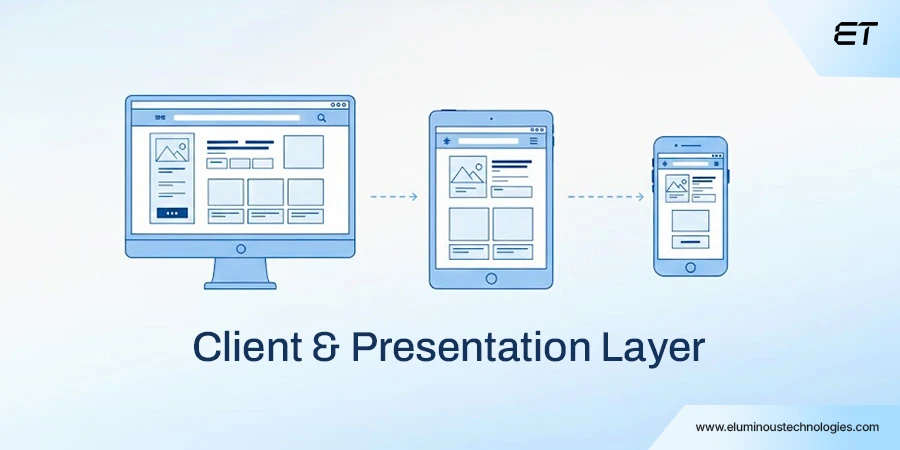
This layer defines how users interact with the application across browsers, mobile devices, enterprise terminals, IoT interfaces, or embedded third-party screens.
Enterprise UX studies show that a 100ms improvement in response time can increase user engagement by up to 7%, underscoring the importance of front-end optimization.
The responsiveness, accessibility, and consistency of the UI, paired with efficient API communication, directly shape first impressions and long-term adoption. Companies like Airbnb and Netflix invest heavily in front-end frameworks and edge rendering techniques to maintain a seamless global experience.
2. The Edge, Delivery, and Security Layer
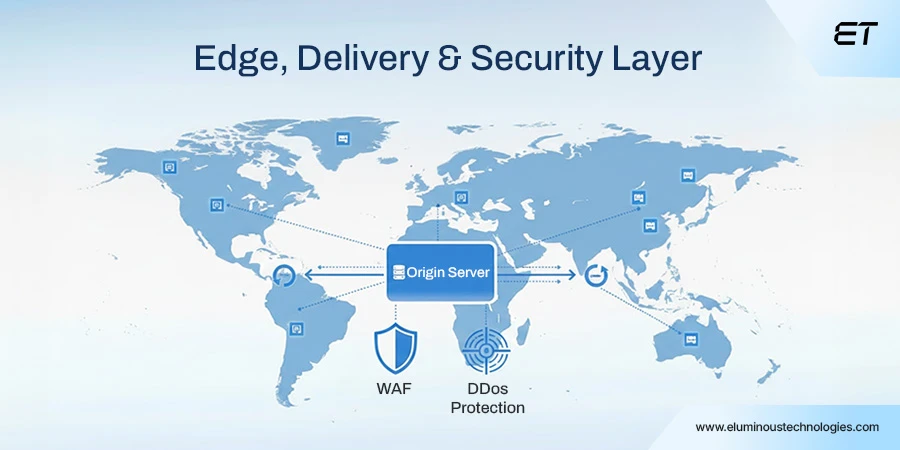
Most enterprises no longer deliver applications directly from their origin servers. Instead, they rely on a robust edge layer that includes:
- CDNs for global content acceleration
- WAFs for application-level protection
- DDoS mitigation systems for attack resilience
- Load balancers for intelligent traffic routing
Akamai reports that over 20% of daily internet traffic comes from bot or attack sources, making this layer essential for uninterrupted performance.
During the 2022 holiday spike, several e-commerce giants sustained 5–10x traffic surges without degradation due to well-architected edge infrastructures.
3. The Application Layer (Core Logic and Processing)
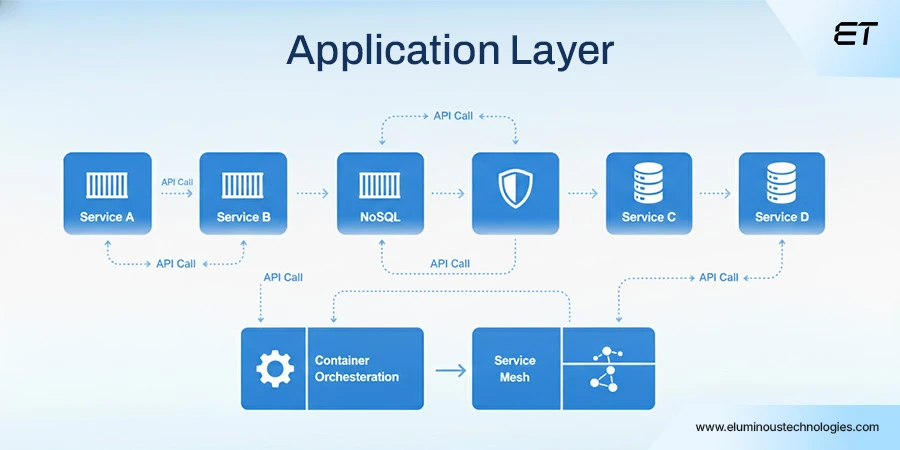
This layer contains the business logic that powers workflows, rules, authentication, and processing. Traditionally, enterprises used monolithic architectures—simple but increasingly brittle at scale.
Today, more than 63% of enterprises have adopted microservices, with companies like Uber and Spotify using service-based architectures to deploy features independently and scale components granularly.
This decoupling accelerates innovation and reduces blast radius during failures.
4. The Data Management Layer
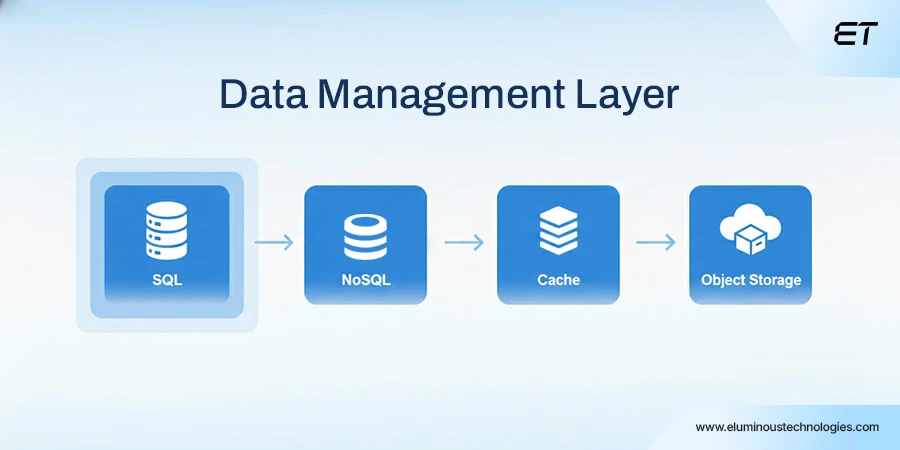
Enterprises typically operate blended data environments combining:
- Relational databases (e.g., PostgreSQL, Oracle)
- NoSQL systems (e.g., MongoDB, DynamoDB)
- In-memory caches (e.g., Redis, Memcached)
- Search engines (e.g., Elasticsearch)
- Long-term object storage (e.g., S3)
This diversity supports transactional workloads, catalogs, analytics pipelines, audit logs, and compliance archives.
IDC reports that global enterprise data doubles every 20 months, increasing the need for distributed, redundant, region-aware data models to maintain availability and durability.
Well-architected data layers minimize downtime. Amazon famously achieves 11 nines of durability (99.999999999%) for its S3 storage architecture.
5. Integration, Messaging, and Service Coordination Layer
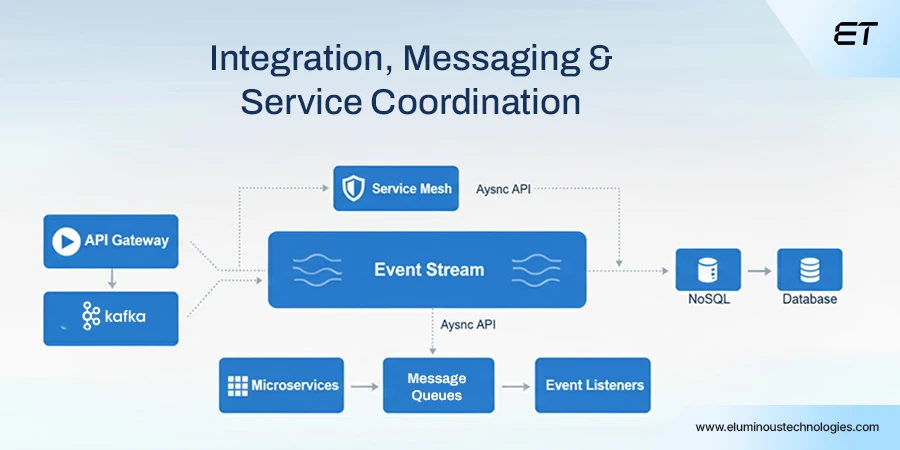
Modern applications rarely operate alone. They must connect with payment gateways, ERPs, CRM platforms, analytics engines, and external data sources.
To manage this complexity, enterprises use:
- Message brokers (Kafka, RabbitMQ)
- Event streaming systems
- API gateways
- Service meshes
These systems ensure reliable, secure, observable communication across the ecosystem. LinkedIn, for example, handles over 7 trillion Kafka messages per day, underscoring the critical role of this layer in real-time, high-volume enterprise operations.
6. Observability, Reliability Engineering, and DevOps Layer
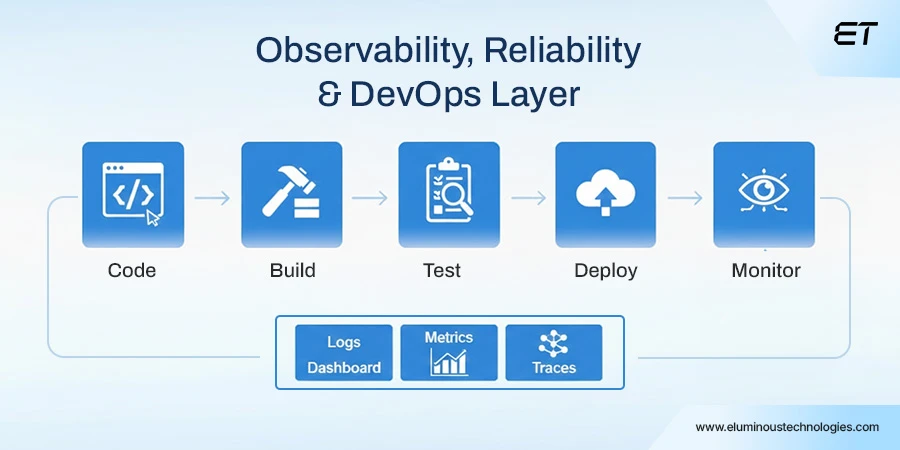
No enterprise architecture is complete without deep observability across logs, metrics, traces, deployments, and security events.
Google SRE principles highlight that 50% of outages can be prevented with better observability and alerting. Combined with:
- CI/CD pipelines
- infrastructure-as-code
- automated rollbacks
- zero-downtime deployment strategies
This layer significantly strengthens reliability and innovation velocity. Companies like Meta and Amazon deploy thousands of updates per day across global systems—enabled entirely by mature DevOps and observability ecosystems.
How Does Web Application Architecture Work?
Web application architecture defines how data flows among users, servers, and databases when someone interacts with a website or web app.
This entire process happens in milliseconds, yet it involves multiple systems working together behind the scenes.
Let’s walk through the full lifecycle of a request, step by step, with enterprise-grade examples you’ll recognize.
1. The Request: User Action Triggers Everything
The process begins the moment a user types a URL or clicks an action.
For example:
- You open Netflix and click “Continue Watching.”
- Or you visit Amazon and search for “wireless headphones.”
At this point:
- Your browser (the client) sends an HTTPS request
- The request includes details like headers, cookies, authentication tokens, and parameters
This request is securely encrypted to protect user data.
2. Resolution & Routing: Finding the Right Server
Before your request can be processed, it needs to find where to go. Here is what happens:
- DNS (Domain Name System) converts the domain name (e.g., amazon.com) into an IP address
- The request is routed to a Load Balancer
The load balancer’s job is critical:
- It distributes traffic across multiple servers
- Prevents overload during traffic spikes (like Black Friday sales or live sports streaming)
For instance, when millions of users log in to Spotify simultaneously, load balancers ensure that no single server crashes.
3. The Processing: Business Logic Takes Over
Once routed, the load balancer forwards the request to an available Web Server or Application Server.
This is where:
- Backend code is executed (Java, Node.js, Python, .NET, etc.).
- Business rules are applied
Examples:
- Netflix decides which shows to recommend
- Amazon calculates pricing, availability, and delivery estimates
- Uber determines nearby drivers and the estimated pickup time
In modern systems, this logic often runs inside microservices, each handling a specific responsibility.
4. Data Retrieval: Talking to Databases & Services
If the request needs data, the application server retrieves it from one or more sources:
- Databases (user profiles, orders, watch history)
- Caches (Redis, Memcached for faster access)
- Third-party APIs (payments, maps, notifications)
For example:
- Amazon fetches your past orders from its database
- Uber queries real-time location data
- Netflix pulls viewing history and recommendation models
This layer is optimized for speed, consistency, and scalability.
5. The Response: Packaging the Result
After processing the request and gathering data, the server prepares a response. Usually:
- JSON → for APIs and frontend frameworks (React, Angular, Vue)
- HTML → for server-rendered pages
- Includes status codes, headers, and payload data
Example responses:
- A list of products
- A personalized homepage feed
- Confirmation of a successful payment
The response is then sent back through the load balancer to the client.
6. Rendering: What the User Actually Sees
Finally, the browser receives the response and renders it on the screen. This includes:
- Updating UI components
- Displaying images, text, and buttons
- Triggering animations or interactions
For example:
- Netflix refreshes your homepage with recommended shows
- Amazon displays filtered search results
- Uber updates the map with driver movement in real time
All of this happens seamlessly, often in under a second.
Why This Architecture Matters
Modern web application architecture ensures:
- Scalability → handles millions of users
- Performance → fast response times
- Reliability → no single point of failure
- Security → encrypted, authenticated communication
This is why global platforms like Netflix, Amazon, and Uber can operate smoothly even during peak demand.
Why Web Application Architecture Has Become a Strategic Priority for Modern Enterprises
Several converging forces have pushed architecture into the strategic spotlight, prompting CIOs, CTOs, and engineering leaders to reassess foundational decisions once considered purely technical.
The High Cost of Downtime and Poor Performance
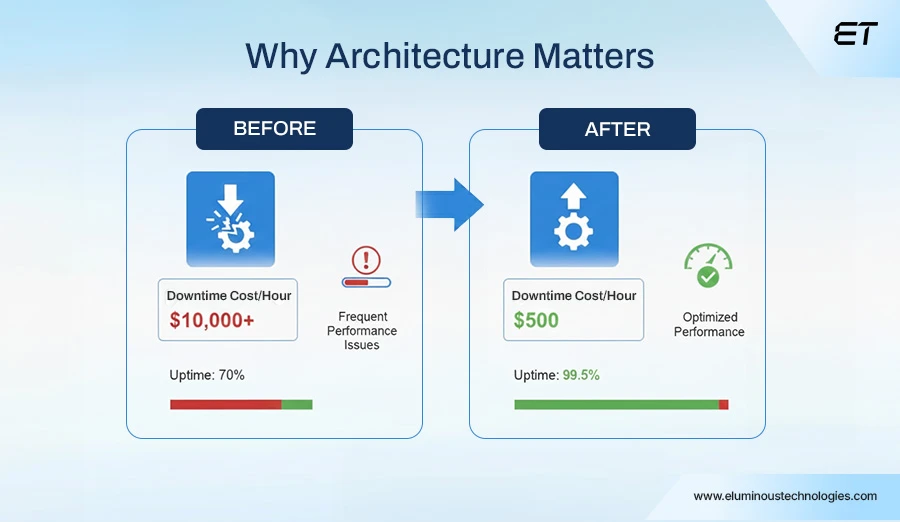
Analysts estimate that enterprises lose more than $300,000 per hour of downtime on average, with some industries, especially e-commerce, finance, and logistics, experiencing losses that can reach multi-million-dollar figures during peak seasons.
This includes not only lost transactions but also diminished customer confidence, negative media exposure, and increased support costs. A fragile or poorly designed architecture dramatically increases the likelihood of outages, cascading failures, and prolonged recovery times.
Rising Customer Expectations Across Channels
Today’s users expect fast, seamless, intuitive, and personalized experiences across web and mobile channels, regardless of their location, device, or time of day.
Legacy architectures often struggle to deliver this consistency due to scalability limitations, outdated technologies, and monolithic constraints.
Enterprises must therefore modernize their architecture to support real-time interactions, elastic scaling, and modular functionality.
Accelerated Pace of Innovation and Digital Transformation
Business environments evolve rapidly, and enterprises are under constant pressure to release new features, integrate emerging technologies, support new business models, and maintain compliance in regulated industries.
Architecture significantly influences how quickly an organization can adapt to these shifts. Those who invest in a flexible, modular, and API-first architecture can innovate continuously without destabilizing their existing systems.
Security and Compliance Requirements Are Intensifying
Regulatory mandates, data protection rules, and industry-specific compliance frameworks now impose strict expectations around encryption, auditing, data governance, and identity management.
A well-engineered architecture integrates these requirements directly into the system’s foundation rather than treating them as external add-ons.
Want to understand how architecture models like Monolithic and Microservices impact scalability and resilience?
12 Web Application Architecture Best Practices
A well-designed web application architecture ensures performance and long-term maintainability as systems grow. Following proven best practices helps teams avoid technical debt, reduce failures, and build applications that scale reliably.
| Sr. No. | Best Practice | Description |
| 1 | Design for Scalability | Build systems that scale individual components as demand grows. |
| 2 | Separate Concerns Clearly | Keep UI, business logic, and data layers independent. |
| 3 | Use Stateless Services | Avoid storing session state on servers to enable easy scaling. |
| 4 | Implement Load Balancing | Distribute traffic evenly to ensure performance and availability. |
| 5 | Optimize Database Access | Reduce database load using indexing, queries, and caching. |
| 6 | Follow API-First Design | Define APIs early to ensure consistency and reusability. |
| 7 | Secure Every Layer | Apply security controls across network, app, and data layers. |
| 8 | Use Caching Strategically | Cache frequently used data to improve speed and efficiency. |
| 9 | Design for Fault Tolerance | Ensure the system continues working despite component failures. |
| 10 | Automate Deployment & Testing | Use CI/CD to deliver updates faster and more reliably. |
| 11 | Monitor and Log Systems | Track performance and errors to speed up issue resolution. |
| 12 | Plan for Evolution | Design architectures that support future changes and growth. |
Types of Web Application Architecture
Monolithic Architecture
In a monolithic architecture, all application components, including the user interface, backend logic, and data access layer, are tightly coupled and deployed as a single unit. This design simplifies initial development and testing because everything resides in one codebase. However, as the application grows, even small changes require redeploying the entire system, making scalability and maintenance increasingly difficult.
Example: A basic content management system where user authentication, content publishing, and admin controls are implemented within one application and deployed together.
3-Tier Web Architecture?
The 3-tier architecture is the industry standard for enterprise applications because it separates concerns, making the system easier to maintain and scale.
1. Presentation Tier (The Top): The user interface and communication layer.
2. Logic Tier (The Middle): The “brain” of the application, where data is processed and business rules are applied.
3. Data Tier (The Bottom): Where the application’s data is stored and managed independently of the logic.
Example: In a banking app, the Presentation Tier shows your balance; the Logic Tier calculates your interest; the Data Tier records the transaction in the ledger.
Microservices Architecture
Microservices architecture divides an application into small, independent services, each focused on a specific business capability. These services communicate via APIs or messaging systems and can be developed, deployed, and scaled independently. This approach improves fault isolation and supports rapid feature delivery but requires robust monitoring and orchestration.
Example: A SaaS application with separate services for user management, billing, notifications, reporting, and analytics, each running as its own deployable unit.
Event-Driven Architecture
Event-driven architecture is built around the production and consumption of events. Instead of directly calling each other, components react to events asynchronously. This design enables real-time responsiveness, loose coupling, and high scalability, especially in systems with frequent state changes.
Example: An order processing system where placing an order emits an event that triggers inventory updates, payment processing, shipping workflows, and notification services independently.
Serverless Architecture
Serverless architecture allows developers to run application logic as functions that execute only when triggered by events or requests. Infrastructure provisioning, scaling, and maintenance are handled by the cloud provider.
This reduces operational overhead and cost for workloads with variable or unpredictable traffic.
Example: An automated file-processing system where uploading a file triggers a function to validate, transform, and store the data without running a continuously active server.
Single-Page Application (SPA) Architecture
In SPA architecture, the application loads once in the browser and dynamically updates content via API calls without full-page reloads. This improves performance and user experience but places more responsibility on the frontend for routing and state management.
Example: An analytics dashboard where charts, filters, and reports update instantly as users interact with the interface, without reloading the entire page.
Hybrid Architecture
Hybrid architecture combines multiple architectural styles within a single system to meet different functional and operational requirements. Organizations often start with simpler architectures and gradually introduce microservices, event-driven components, or serverless functions as complexity increases.
Example: An enterprise platform that uses microservices for core business features, serverless functions for background tasks, and event-driven workflows for real-time data synchronization.
Monolithic Architecture vs Microservices – Web Application Architecture
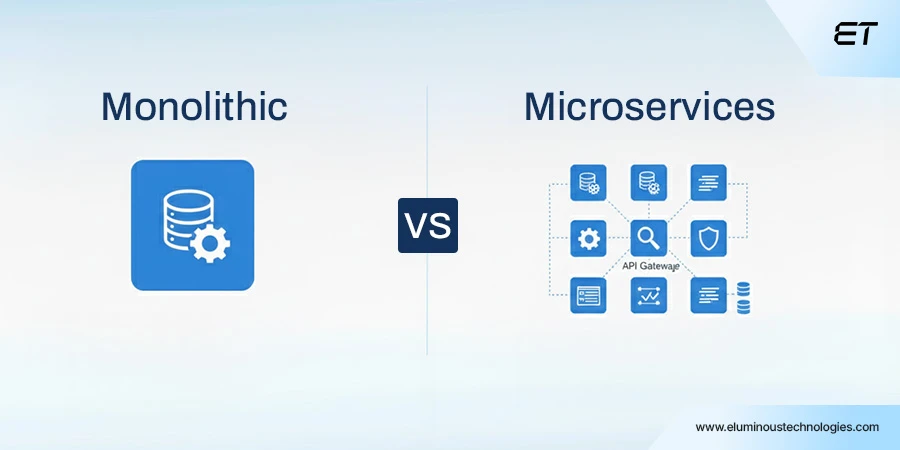
While microservices have gained immense popularity due to their modularity and scalability advantages, the enterprise journey toward microservices is rarely immediate or absolute. Many organizations continue to operate robust monolithic systems, but gradually transition certain domains into microservices based on business needs.
Monolithic Architectures in Enterprises
Large companies often begin with monolithic structures because they simplify development, reduce early-stage complexity, and centralize knowledge. However, as user bases expand and applications grow, monoliths may face scalability challenges, tangled dependencies, and slower deployment cycles.
Microservices Architectures in Enterprises
Microservices offer clear advantages, including independent deployment, isolated scaling, improved fault isolation, and team autonomy. They enable enterprises to distribute workloads, adopt cloud-native patterns, and move toward decentralized ownership models for faster innovation.
Finding the Balance
The most successful enterprises adopt a hybrid strategy, maintaining a stable monolith for core functions while gradually migrating fast-changing or performance-intensive modules such as authentication, payment processing, analytics ingestion, or notification systems into microservices. This balanced approach mitigates risk while still providing the long-term benefits of modularity and scalability.
The Architectural Capability That Defines Scalability
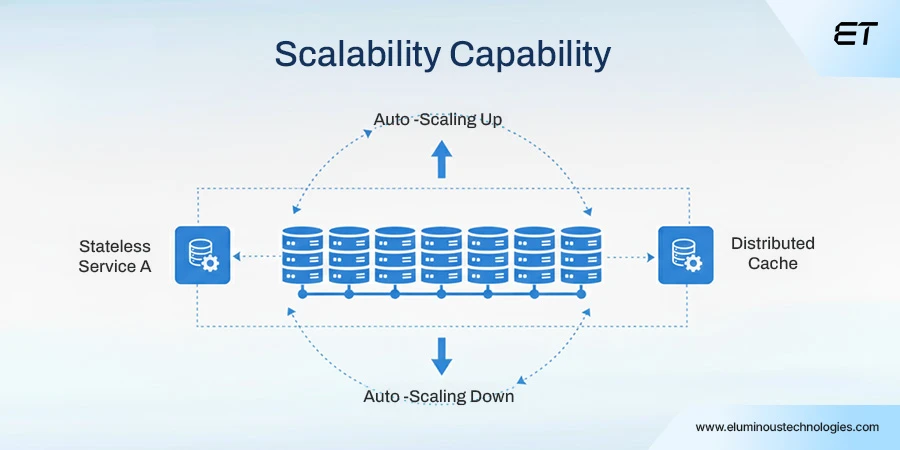
Scalability is more than the ability to handle increased traffic; it represents the application’s capacity to grow without sacrificing performance, reliability, or cost-efficiency.
A scalable architecture ensures systems can handle seasonal peaks, marketing-driven surges, or sudden user growth without developers scrambling to manually provision servers or resolve performance bottlenecks.
Achieving enterprise-scale performance typically requires:
- Stateless service design,
- Automated horizontal scaling,
- Distributed caching strategies,
- Asynchronous workloads,
- Microservices for high-load areas,
- Hyperscale-ready data partitions.
When implemented well, scalability becomes a business advantage, allowing companies to seize opportunities without fear of technical failures.
Modernizing Enterprise Web Architecture Without Disrupting Operations
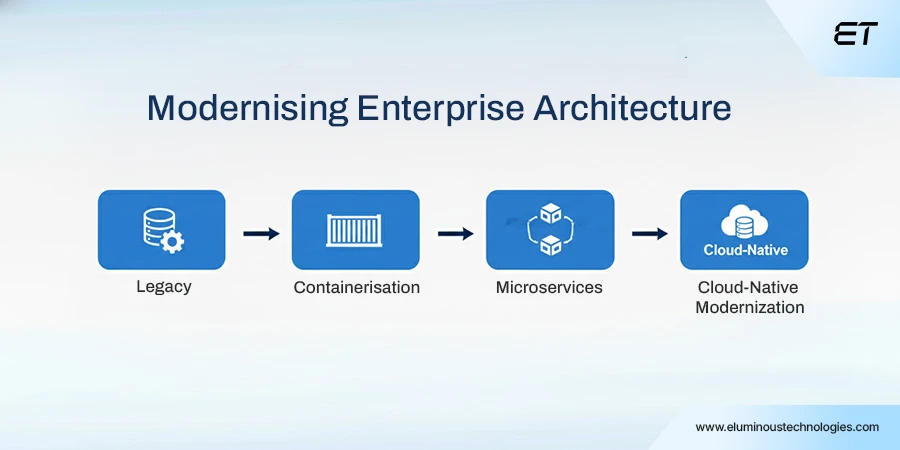
Enterprises cannot afford downtime during modernization efforts, which is why they typically follow an incremental approach:
- Mapping the current architecture and identifying hotspots,
- Establishing API gateways and central observability early,
- Adopting containerization for isolated services,
- Breaking off high-impact modules into microservices,
- Implementing CI/CD automation for controlled releases,
- Gradually migrating legacy components to cloud-native infrastructure.
This ensures business continuity while enabling long-term modernization.
Wrapping Up
For modern enterprises, Web Application Architecture has become a decisive factor in how effectively they scale, innovate, and deliver consistent digital performance.
The architecture’s strength directly influences development velocity, operational resilience, and the long-term reliability of every business-critical system.
Enterprises that prioritize architectural excellence are better equipped to evolve continuously and compete with confidence in a digital-first world.
Frequently Asked Questions
1. What is an example of a web architecture?
A common example of web architecture is an e-commerce platform where the frontend handles user interactions, the backend processes orders and payments, and the database stores customer, product, and transaction data.
Supporting layers such as load balancers, APIs, and caching systems help ensure the application remains fast, secure, and scalable during traffic spikes.
2. What is application architecture with an example?
Application architecture defines how software components are structured and interact.
For example, in a banking web application, the presentation layer displays account information, the application layer enforces business rules like transaction validation, and the data layer securely stores account balances and transaction history. This separation ensures security, maintainability, and scalability.
3. What is the basic website architecture?
Basic website architecture typically follows a client–server model, in which a user’s browser sends a request to a web server, the server processes it, retrieves data as needed, and returns a response. Simple websites may combine frontend, backend, and database logic, while larger systems separate them into independent layers.
4. How is web application architecture different from system architecture?
Web application architecture focuses specifically on how web-based applications are designed and delivered, including frontend, backend, APIs, and databases. System architecture is broader and includes hardware, networks, operating systems, and infrastructure that support multiple applications across an organization.
5. Why is web application architecture important for scalability?
Web application architecture determines how easily an application can handle growth in users, data, and transactions. A well-designed architecture enables horizontal scaling, fault tolerance, and performance optimization, allowing applications to grow without frequent downtime or costly redesigns.


How to Conduct Technical Due Diligence for Offshore Software Companies
You’re on a Zoom call with a potential offshore software partner. The deck looks flawless; sleek UI mockups, confident faces,…


Programming Outsourcing: When to Do It (And When Not to)
Key Takeaways: Programming outsourcing implies hiring an external team or agency to handle software development. The right outsourcing vendor catalyzes…


