 Book a Meeting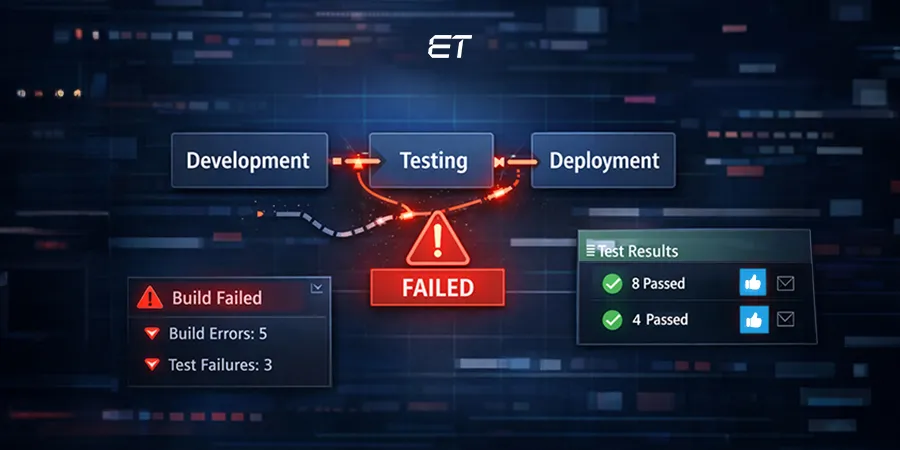
Web Application Testing Done Right: A Practical Playbook for CTOs


- Web application testing is the process of verifying that an app works without breaking.
- Today, AI-driven, automated, and observability-integrated QA are new facets that protect revenue, users, and brand reputation.
- Focusing on high-impact modules and edge cases ensures your testing targets real-world failures.
- Fewer production failures, faster release cycles, and optimized QA resources convert into revenue protection and user trust.
- Using Gen AI can speed up your web app testing process. However, it’s vital to combine AI developers’ expertise to ensure a foolproof workflow.
Remember July 2024? People turning on their Microsoft devices saw the dreaded Blue Screen of Death. Yes, we’re referring to CrowdStrike’s faulty update incident. It’s a stark reminder to never overlook a solid web application testing process.
If you’re a C-level professional, web app testing must be your prime focus. Simply put, it’s the method that ensures your application is smooth, secure, and stable before your users ever notice a problem.
However, the main question isn’t about the basics. Even today, the overall testing framework remains consistent. Your focus should be on the additions and modifications.
This guide isn’t another typical A-to-Z blog. We break down web app testing for 2026, including AI test automation, low-code testing, and more. By the end of this piece, you’ll learn what modern testing should include.
What’s New in Modern Web Application Testing

The truth is, the core of web app testing hasn’t changed dramatically. You’re still checking functionality, performance, and security. What’s different in 2026 is how and where you do it, and the tools at your disposal to catch problems before they become crises.
Here’s the new stuff you should check out:
1. AI-Powered Test Automation
2. Continuous Testing in CI/CD Pipelines
3. Observability-Integrated QA
4. Shift-Left Security Testing
5. AI-Powered Visual & UX Regression
6. Testing for Low-Code, Web3, and Edge Apps
Fret not. We decode every trend in depth so that you don’t need to explore ten different blogs.
1. AI-Powered Test Automation

Forget the old school approach of writing and running test scripts. AI-powered test automation in 2026 is the new clever play. It uses machine learning to analyze your app’s architecture, past defects, code dependencies, and user behavior. Then, it generates test cases that matter most.
Why it matters to you as a CTO:
- Risk-first testing: AI prioritizes high-risk modules, so your team isn’t wasting cycles testing parts of the app that never fail
- Dynamic test generation: As your code evolves, AI updates test coverage automatically
- Intelligent regression: Instead of blindly rerunning the same tests after each commit, AI identifies the smallest, most impactful regression set
- Data-driven decisions: AI provides a dashboard highlighting risk hotspots, flaky tests, and failure trends, giving you actionable insights rather than vague reports.
Pitfalls to watch:
- Unquestioningly trusting AI isn’t enough. It still needs human oversight to validate test logic
- Early adoption requires integration with your CI/CD pipeline, and misconfigurations can cause missed failures
- Flaky tests or noisy telemetry can confuse the AI if not managed properly
Example:
Your SaaS app launched a new dashboard with real-time analytics.
Traditionally, QA might manually test core functionality and a few edge cases. AI-powered testing identifies a subtle issue: when a user combines a rarely used browser extension, a slow network, and a newly released API module, the dashboard fails silently.
The AI generates a targeted test, flags the bug, and your team fixes it before any customer is affected.
The takeaway?
With AI-powered testing, you’re catching the things no human sees, and saving millions in potential downtime and bad PR.
2. Continuous Testing in CI/CD Pipelines
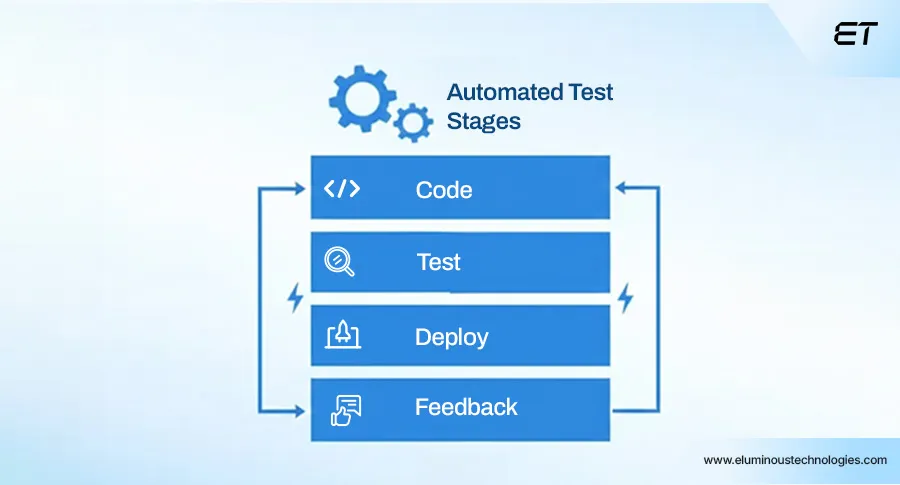
Here’s the reality: if your QA is still a stage at the end of your app development cycle, you’re setting yourself up for missed deadlines and angry users. In other words, continuous testing is a must-have approach in 2026.
Continuous testing means that every code change triggers automated tests, including unit and integration tests, as well as performance, security, and regression tests. It gives your team instant feedback on what works, what’s broken, and what could hurt if released.
Why it matters to you:
1. Faster, safer releases: Every commit gets validated automatically
2. Shift-left reliability: Bugs are caught immediately in development
3. Predictable engineering output: You know exactly how stable a release is before it hits users
4. Data-driven decision-making: Continuous pipelines generate metrics helping you allocate resources where they matter
Pitfalls to watch:
- Poorly designed tests can give false confidence
- CI/CD pipelines must scale with your app; otherwise, test execution becomes slow and defeats the purpose
- Test flakiness can mask real issues. So, invest in a reliable test infrastructure
Example:
Say your team is rolling out a new e-commerce checkout flow with multiple payment gateways. Every time a developer pushes code, the CI/CD pipeline triggers:
- Unit tests for new modules
- Integration tests for payment flows
- Performance tests simulating thousands of concurrent users
- Security tests checking for API vulnerabilities
The pipeline catches a rare race condition where, under high load, a coupon calculation fails for specific gateways. The team fixes it before the release, avoiding customer frustration, lost revenue, and the need for emergency hotfixes.
The takeaway?
You can release fast and scale your app, knowing your QA process is automated, intelligent, and always on.
3. Observability-Integrated QA

Here’s the problem most CTOs face: your app works in a test environment, but once it hits production, things start breaking.
Observability-integrated QA solves that. It uses real telemetry to make your tests smarter.
Modern apps generate tons of data: logs, metrics, traces, and user behavior. Instead of guessing what could break, QA uses this data to create tests that mirror actual usage patterns.
Why it matters to you:
1. Tests reflect reality: No more hypothetical scenarios that never happen in production
2. Early detection of complex bugs: Observability data highlights edge cases that only show up under real-world conditions
3. Faster root-cause analysis: When something fails, telemetry helps your team pinpoint the issue in minutes, not hours
4. Strategic planning: You can see trends and hotspots in your app and proactively strengthen weak areas
Pitfalls to watch:
- Not all telemetry is useful. So, filter noise to focus on actionable signals
- Integration can be tricky; QA and development teams must align on crucial metrics
- Observability isn’t a replacement for testing. Implement it only to enhance and guide your QA
Example
Your SaaS platform tracks real-time user activity. Observability-integrated QA notices that during peak usage, certain API endpoints slow down or time out.
Using this data, your QA team builds targeted tests that replicate these peak-load scenarios. As a result, they catch failures before they reach paying customers.
The bottom line?
Observability-integrated QA turns your app’s telemetry into a testing base. It gives CTOs real insight into app behavior, reduces surprises in production, and makes your QA process reliable.
4. Shift-Left Security Testing
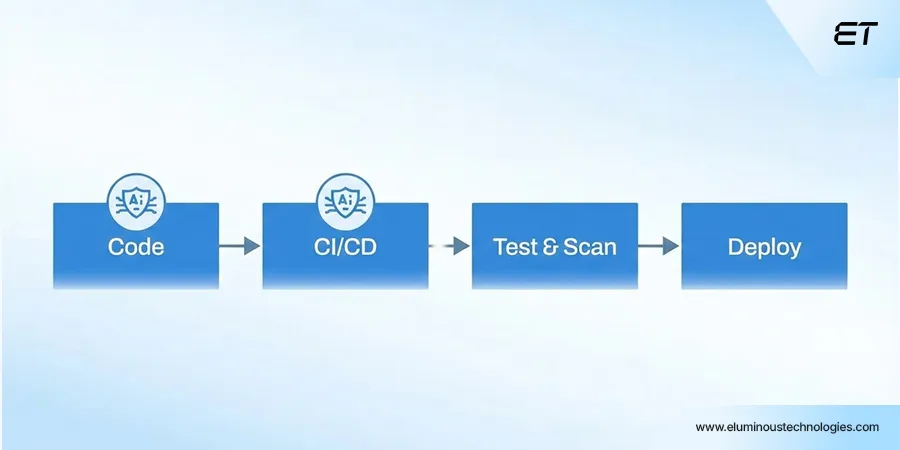
Here’s the hard truth: waiting until the end of development to check for security issues is risky. In 2026, shift-left security testing is the standard.
It means integrating security checks right into development. Basically, you don’t leave them to QA at the last minute. Modern frameworks now allow security tests to run automatically as code is written. For you as a CTO, it’s a great opportunity.
Why it matters to you:
1. Catch vulnerabilities early: Issues detected during development are cheaper and faster to fix than production bugs
2. Reduce emergency patching: Fewer late-night fire drills and hotfixes
3. Ensure compliance and audit readiness: Many industries now demand security testing before deployment
4. Protect revenue and reputation: A single breach can cost millions and erode user trust
Pitfalls to watch:
- Security automation is only as good as the rules and coverage you configure
- Developers need training; otherwise, false positives or blind spots creep in
- Don’t ignore performance impact. Overly aggressive checks can slow down CI/CD pipelines
Example:
Imagine your fintech app integrates multiple banking APIs.
Shift-left security testing automatically flags a scenario in which invalid session tokens, combined with API latency, could expose sensitive data. The team fixes it immediately, avoiding potential financial losses, regulatory penalties, and customer churn.
Takeaway:
Shift-left security testing transforms security from an afterthought into a core part of your release strategy.
5. AI-Powered Visual & UX Regression
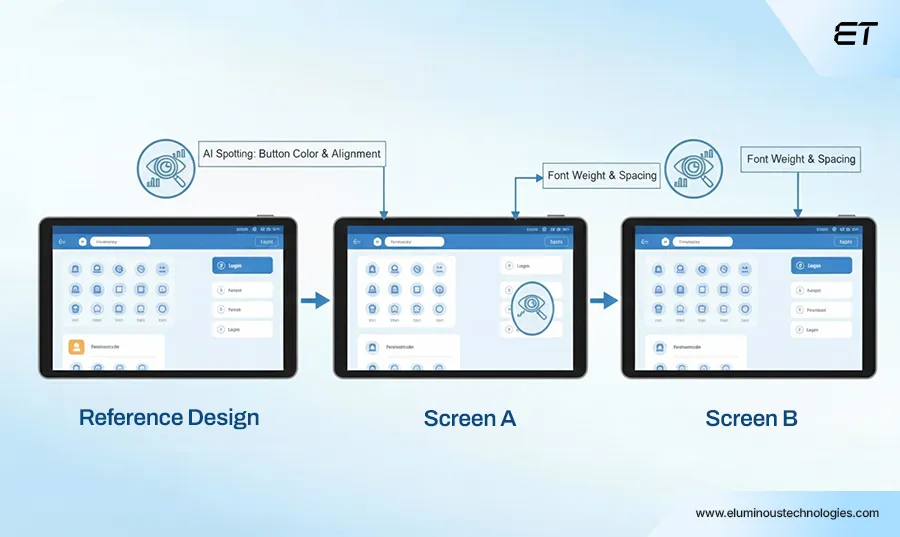
Here’s the reality: your app might function perfectly, but if buttons shift, layouts break, or colors are inconsistent, users notice and leave. AI now automatically detects even the most minor visual inconsistencies across browsers, devices, and screen resolutions.
Why it matters to you as a CTO:
1. Consistent user experience: Prevents UI/UX issues that frustrate customers and hurt adoption.
2. Catches subtle failures humans often miss: AI spots tiny misalignments, overlapping text, broken icons
3. Speeds up releases: Tests run automatically across thousands of device/browser combinations
4. Actionable insights: Provides snapshots and reports pinpointing exactly what broke and where
Pitfalls to watch:
- False positives can happen. Proper thresholds and rules are essential
- Integration with your CI/CD and test pipelines is critical; otherwise, it’s just another unnecessary tool
Example:
Your global media platform just launched a redesign. The AI-powered visual regression tool runs across iOS, Android, Windows, and multiple browser versions.
It detects that a new carousel component misaligns on small-screen Android devices, causing text overlap and unreadable headlines. The team fixes it before any users notice, avoiding complaints, app store backlash, and brand damage.
Bottom line:
AI-powered visual and UX regression protects your brand, maintains user trust, and ensures a flawless experience.
6. Testing for Low-Code, Web3, and Edge Apps

Low-code platforms, Web3 integrations, and edge computing have changed the testing game. If you don’t adapt to these new facets, you risk bugs, downtime, and costly user frustration.
Why it matters to you as a CTO:
1. Low-code apps: They accelerate delivery but hide complex dependencies. Testing must catch integration issues without breaking the abstraction
2. Web3 and decentralized apps: Smart contracts, token flows, and blockchain nodes require specialized tests for security, transaction integrity, and scalability
3. Edge computing: Apps running closer to users reduce latency but introduce distributed failure points. Testing must cover performance and reliability across nodes, networks, and geographies
Pitfalls to watch:
- Treating low-code platforms like traditional codebases leads to missed edge-case failures
- Web3 testing without simulating real transaction flows can mask serious vulnerabilities
- Edge app tests must account for network instability and inconsistent device capabilities
Example:
Your company launches a low-code internal workflow platform with Web3 integration for token-based transactions.
A developer pushes a new module that works perfectly but fails under load in production. Advanced testing simulates real-world edge conditions, multiple nodes, and Web3 transaction scenarios, catching bugs before they reach employees. The fix ensures smooth, reliable operation and prevents costly downtime.
Bottom line:
Low-code, Web3, and edge apps introduce new failure modes that traditional testing misses. Investing in forward-looking QA saves headaches, downtime, and reputational risk later.
The Types of Web Application Testing You Can’t Ignore
Even if you’re focusing on 2026 innovations, a brilliant CTO still needs to know the categories of testing your teams are running.
Here’s the quick view:
| Type of Web Application Testing | What It Means for Your App |
| Functional Testing | Ensures your app does what it’s supposed to (core workflows like login, checkout, dashboards, etc.). |
| Performance Testing | Measures speed, stability, and scalability; ensures the app can handle peak traffic and heavy loads. |
| Security Testing | Checks for vulnerabilities, weak authentication, data leaks, and protects your business from breaches. |
| Usability / UX Testing | Ensures the app is intuitive, easy to use, and provides a seamless experience for your users. |
| Compatibility Testing | Confirms the app works across browsers, devices, and operating systems. |
| Regression Testing | Makes sure new updates or features don’t break existing functionality; often automated in modern pipelines. |
As a CTO, you don’t need to run these tests yourself. But you need visibility into the types, automation process, and potential risks.
The Modern Web Application Testing Process
Modern web app testing is dynamic, AI-driven, and integrated into your release pipeline. Here’s how a 2026-ready process looks.
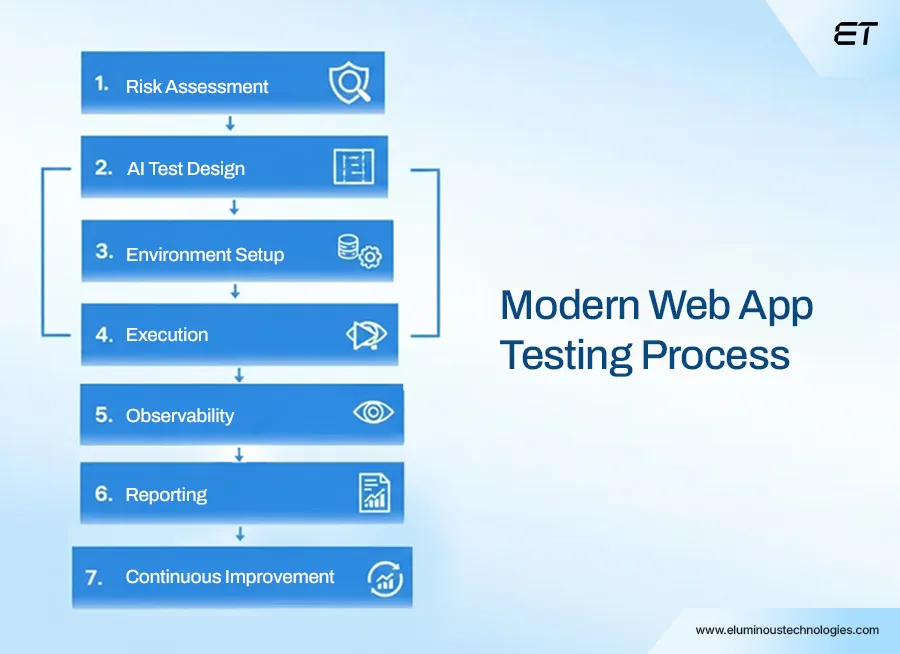
Step 1: Risk Assessment & Test Planning
Here’s the first truth: you can’t test everything. The smartest way to start web application testing is by asking: what will actually break and cost us the most if it does?
Modern AI tools scan your codebase, analyze past bug history, monitor user behavior, and highlight high-risk modules. Suddenly, your QA team hits the spots that could tank your app or revenue.
Example: Imagine you just released a new analytics dashboard. Traditional QA might focus on visible features, but AI risk assessment spots that the integration with a third-party API could fail under certain data conditions. Your team runs targeted tests there first before your customers ever notice.
For a CTO, this step is strategic risk management. Done right, your web application testing protects your users and your brand.
Step 2: AI-Enhanced Test Case Design
Let’s be real. Manually writing hundreds of test cases is a waste of human brainpower. In 2026, smart web application testing is about letting AI do the heavy lifting.
It analyzes historical failures, code changes, and user behavior to automatically generate test cases most likely to break in real conditions.
In other words, artificial intelligence frees your QA team to focus on tricky flows, creative edge cases, and scenarios AI can’t predict.
Example: Your SaaS app rolled out a new multi-step onboarding flow. Traditional QA might check happy paths and a few error cases. AI-enhanced test case design detects a rare scenario: if a user signs up via a specific browser, with a VPN enabled, and uses certain profile data, the flow breaks silently.
A test is generated automatically for that exact scenario. The bug gets caught before users ever hit it, saving potential churn and support headaches. For you as a CTO, this step transforms web application testing from a checkbox activity into a predictive, risk-focused system.
Step 3: Environment Setup
Here’s where most teams mess up: they test in environments that don’t resemble the real world. In 2026, for web application testing to be meaningful, your environment has to mirror production conditions.
Modern setups use cloud-based device farms, containerized environments, and AI simulations to replicate real-world conditions. So, your goal is to leverage these.
Example: You launch a new internal workflow tool that employees use from laptops, tablets, and phones across multiple office locations. AI simulations replicate slow VPN connections, mobile browsers, and intermittent network outages. The environment setup flags a subtle bug: certain forms fail to submit on older tablet models under high load. Fixing this before release avoids downtime, frustrated users, and unnecessary support tickets.
This step ensures your web application testing isn’t theoretical. You’re testing in conditions your users actually encounter, reducing surprises and making releases reliable.
Step 4: Test Execution
In 2026, web application testing must be continuous, automated, and intelligent.
Modern execution uses AI-powered automation to run functional, performance, security, and visual tests simultaneously. The AI monitors for anomalies, flags flaky tests, and highlights unexpected behavior in real-time. This is where your QA pipeline starts being a strategic asset.
Example: Your SaaS product added a new analytics feature. Traditional QA might run regression tests only on core flows. During AI-driven test execution, the system detects that under a combination of high user load and a specific third-party API call, some reports fail silently. The bug gets flagged before it reaches customers, saving potential revenue loss and support headaches.
For a CTO, this step means releasing with confidence. Basically, you have real-time visibility into failures, and your team can fix critical issues before they impact users.
Step 5: Monitoring & Observability Integration
Let’s get real: passing tests in a QA environment doesn’t guarantee your app will behave perfectly. That’s why, in 2026, web application testing needs to draw on real-world data.
Modern tools ingest logs, metrics, traces, and user behavior from production-like environments to shape smarter tests. Instead of guessing what could break, your QA team now tests what actually breaks in the field.
Example: Your customer support dashboard handles thousands of concurrent queries. Observability integration spots that under peak load, certain API calls slow down dramatically. QA can now create targeted tests that replicate these conditions, catching holdups before live users experience delays.
This step is about turning real user behavior into actionable QA insights. Your web application testing becomes predictive, and your team anticipates failures swiftly.
Step 6: Reporting & Actionable Insights
If your team only hands you a list of pass/fail results, you’re flying blind. Modern web application testing delivers actionable insights that impact business decisions.
AI-powered dashboards highlight:
- Risk hotspots (modules most likely to fail in production)
- Flaky or unreliable tests
- Coverage gaps (areas not tested sufficiently)
Example: Your SaaS platform rolls out a new reporting module. Traditional reporting might just show ‘tests passed.’ The AI-driven dashboard, however, shows that while core reports worked, custom filters under high load failed intermittently. Your team fixes it before release, avoiding customer complaints and downtime.
For a CTO, this step is gold. You get insight. Web application testing is all about prioritizing fixes, allocating resources effectively, and mitigating risk before it hits users.
Step 7: Continuous Improvement
Here’s the thing: web application testing isn’t a one-and-done activity. In 2026, the smartest teams treat QA as a self-improving system. Every test, every failure, every anomaly feeds back into your AI and automation engines, making the next cycle smarter, faster, and more predictive.
Your QA process learns from real user behavior, past bugs, and edge-case scenarios. So, your team is always one step ahead of failures.
Example: Your e-commerce platform deployed a new recommendation engine. The first release uncovers a rare bug where personalized suggestions fail under certain browsing patterns. The AI logs this, updates predictive test scripts, and ensures that future releases automatically cover this scenario, preventing the same issue from recurring.
For a CTO, this means your web application testing pipeline is continuously evolving, anticipating problems, and improving coverage.
Automation & QA Best Practices for Modern Web Application Testing
If you think automation is just ‘run tests faster,’ you’re doing it wrong. Here’s how top-tier teams do it, and how you should think about it as a CTO.
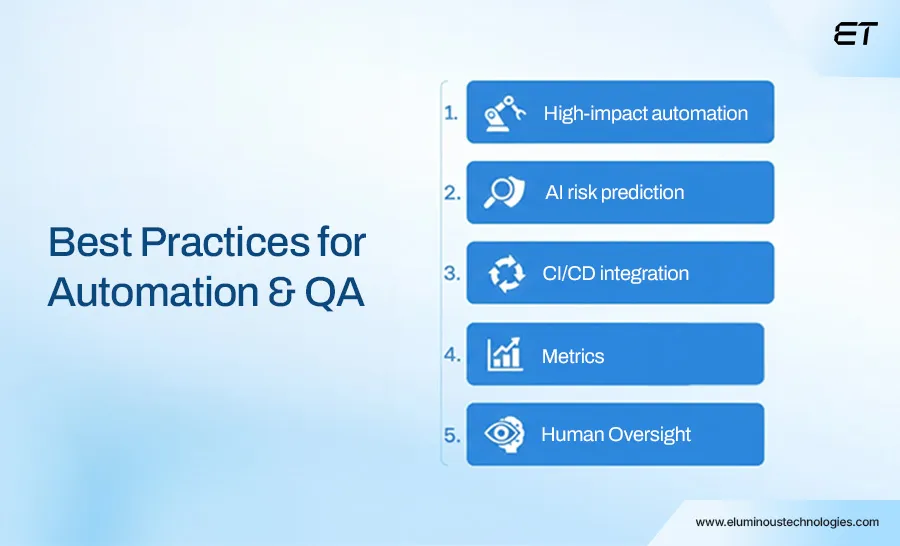
1. Automate High-Impact, Repetitive Tests
Not every test needs automation. Focus on critical flows, high-risk modules, and regression suites. Use AI to decide which tests to run on every build, so your pipeline isn’t clogged with trivial checks.
Example: In a SaaS billing platform, your subscription renewal process is automated for every commit. The AI notices a rare edge case with multi-currency accounts and automatically generates a new regression test. Without this, a bug could have slipped into production, costing revenue and support headaches.
2. Use AI to Predict Risk, Not Just Execute Tests
Automation alone isn’t smart. AI-enhanced QA predicts where bugs are likely to appear based on historical failures, code complexity, and user behavior. It ensures your team spends effort preventing real risks, not running unnecessary scripts.
Example: After deploying a new analytics dashboard, AI flags that a combination of browser extensions and specific API calls could cause visualizations to break. Automated tests run for this scenario first, catching failures before users ever notice.
3. Integrate Automation Into CI/CD Pipelines
Modern QA is continuous. Automated tests should run on every commit, merge, and pre-release. Observability metrics and telemetry should feed back into the system, making each cycle smarter than the last.
Example: Your e-commerce app pushes a new checkout feature. CI/CD triggers automated functional, performance, and security tests. Observability integration identifies an API latency issue under peak load, allowing your team to fix it before customers experience it.
4. Measure What Matters
Don’t get lost in vanity metrics. Track:
- Test coverage on high-risk areas
- Flaky test rates and resolution time
- Mean time to detect and fix failures
- AI-predicted vs. actual failures caught
This gives you real insight into QA ROI (think parameters like speed, reliability, and risk mitigation).
5. Balance Human Oversight With Automation
Even AI-driven pipelines need a human in the loop. Developers and QA should review AI-generated test cases, failure patterns, and anomalies. Blind trust can miss gaps or produce false positives.
Example: AI flagged a subtle authentication edge case in a finance app. A human review confirmed it was valid, then automated tests were updated to cover it in all future releases.
Bottom line for CTOs: Modern testing is about running smarter, targeting real risk, and embedding AI into the pipeline without losing human judgment.
Common Pitfalls in Modern Web Application Testing
Even the smartest teams stumble. In 2026, modern web app testing is powerful, but only if you avoid the traps that can waste time, create blind spots, or increase risk. Here’s what you need to watch out for.
| Pitfall | Why It Matters |
| Blindly Trusting AI | AI predicts failures, but it can miss edge cases or produce false positives. Human oversight ensures your tests are valid and actionable. |
| Neglecting Environment Fidelity | Testing in unrealistic environments hides real-world bugs. Your QA must mimic production conditions like devices, networks, and load patterns. |
| Ignoring Observability Integration | Without telemetry feedback, tests can’t target real user behaviors, leaving critical bugs undetected. |
| Over-Automation Without Strategy | Automating every test slows pipelines and wastes effort. Focus automation on high-risk, high-impact areas. |
| Treating QA as Optional or Late-Stage | Leaving testing to the end increases downtime risk, missed bugs, and customer impact. Early, continuous testing prevents costly failures. |
| Poor Metrics & Reporting | Tracking vanity metrics (like number of tests run) instead of business-impact metrics means you won’t see real ROI from your web application testing efforts. |
Future Trends in Web Application Testing CTOs Should Watch

The next wave of web app testing is going to reshape how teams release software, catch bugs, and safeguard business outcomes. Here’s what every CTO should have on their radar.
1. Generative AI Creating Test Scenarios Automatically
AI will write tests for you, anticipating edge cases you didn’t even think of. Imagine releasing a new feature, and the AI has already generated several test cases that cover unexpected user behaviors, browser quirks, and network conditions.
2. Self-Healing Test Pipelines
Flaky tests, broken scripts, or environment mismatches? Tomorrow’s pipelines fix themselves automatically, reducing false positives and keeping your web application testing consistent, reliable, and high-speed.
3. Predictive QA Based on Real User Telemetry
Observability will evolve from reactive dashboards to predictive intelligence. Your QA system will spot failure patterns before users even experience them, essentially preempting outages and performance issues.
4. Testing for Decentralized, Multi-Cloud, and Edge Architectures
Applications are no longer monoliths. Distributed services, edge computing, and Web3 integrations mean QA must simulate complex, real-world conditions at scale. CTOs will need to ensure coverage spans all nodes, clouds, and endpoints.
5. Continuous UX & Accessibility Verification
AI-driven visual regression and UX testing will extend to real-time accessibility audits. Your app won’t just function; it will look perfect, behave intuitively, and remain accessible for all users across devices.
The future of web application testing is proactive, intelligent, and integrated into every aspect of development. For a CTO, staying ahead means investing in tools and processes that aren’t just relevant today but will evolve automatically for tomorrow.
Wrapping Up: Modern Web Application Testing is Non-Negotiable
If you’ve made it this far, one thing should be clear. Web application testing in 2026 is a strategic, risk-focused, AI-powered engine that protects your users, your revenue, and your brand reputation. From AI-enhanced test case design to observability-driven QA, predictive regression, and continuous improvement, the modern approach is critical.
For a CTO, the takeaway is simple: you can’t afford surprises in production. Every release, every update, every integration needs intelligent, automated testing. When done right, it’s practically your business assurance.
Our QA engineers specialize in modern, AI-driven web application testing. So, you catch critical bugs before your users.
FAQs: Web Application Testing
1. What is web application testing, and why is it essential for CTOs?
Web application testing is the process of ensuring your app works smoothly, securely, and reliably before users see it. For CTOs, it’s a strategic tactic against downtime, security breaches, and costly user-facing bugs.
2. What are the latest trends in web application testing for 2026?
Modern testing integrates AI-driven automation, observability data, predictive QA, visual and UX regression, and testing for low-code, Web3, and edge applications.
3. How can AI improve web application testing?
AI can generate predictive test cases, detect anomalies, flag high-risk modules, and even optimize regression suites. This ensures your web app testing pipeline targets real-world risks.
4. What types of web application testing should CTOs be aware of?
Functional, performance, security, usability/UX, compatibility, and regression testing are core types. Modern testing adds AI-enhanced and observability-integrated layers to focus on high-impact, real-world failures.
5. How do I measure ROI from web application testing?
Track reduced downtime, faster release cycles, fewer production defects, and optimized QA resource allocation. Effective web application testing translates to revenue protection, improved efficiency, and brand trust.
6. Can I entirely rely on automation for web application testing?
No. Automation accelerates testing, but human oversight is crucial for handling edge cases, verifying anomalies, and making decisions. The best results come from a blend of AI, automation, and expert QA.
7. How do I ensure my testing keeps up with modern architectures like Web3 or edge computing?
Use observability-integrated QA, predictive test cases, and distributed environment simulations to mirror real-world conditions. This ensures your testing covers all nodes, devices, and integration points.

Making AI-Powered Development Security Work for You
In the rush to adopt AI, many teams focus on speed and innovation. But often, security takes a back seat.…


The Role of AI in Software Testing
In enterprise software delivery, failure rarely comes from lack of effort; it comes from a lack of foresight. As systems…