
 Book a Meeting
ServiceNow Workflow Automation Readiness Checklist: 8 Areas to Validate Before You Automate

ServiceNow workflow automation coordinates enterprise processes across HR, IT, security, finance, and customer service. But this automation works effectively only when the underlying process is ready to be automated.
A practical readiness checklist helps evaluate processes before building the workflows. It elaborates on stable rules, accountable ownership, trusted data, exceptions, and results. You also recognize readiness, identify warning signs, and can successfully create a pilot.
The checklist gives organizations clear insight into their next move: automate now, redefine the pilot, or review their processes.
Manual coordination in complex processes can be time-consuming. So, companies turn to platforms like ServiceNow that orchestrate workflows across various functions.
But using a particular platform doesn’t make the organization process-ready. If ownership is unclear, data is unreliable, or exceptions are handled informally, automation can amplify those problems rather than solve them.
Before approving automation, it’s wise to verify that the process has a defined outcome, stable rules, trusted data, and testable exception paths. You must thoroughly review current business processes before defining the logic of a workflow automation.
That’s where the ServiceNow workflow automation checklist comes in the picture. It helps you assess various enterprise conditions before automation begins.
In this blog, you’ll get a handy checklist to decide whether to automate now, narrow the scope, or fix the underlying process first.
What Makes a Process Suitable for ServiceNow Workflow Automation
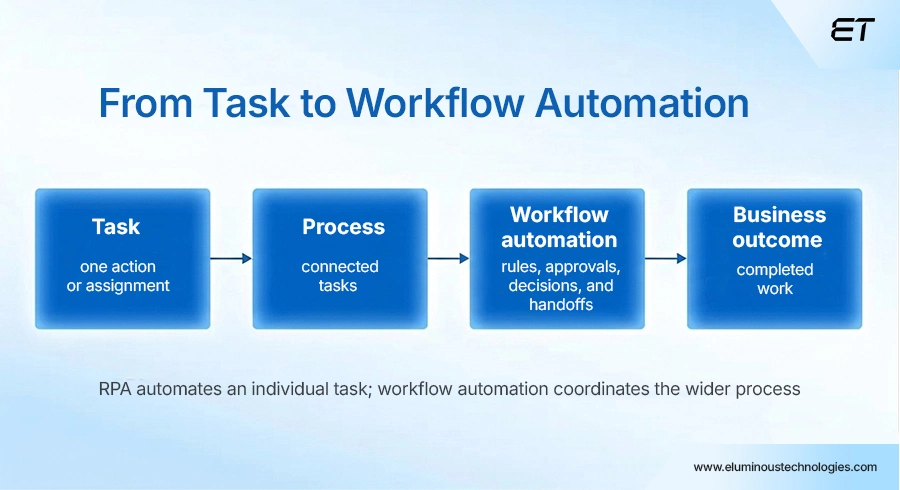
ServiceNow workflow automation directs the movement of tasks, people, systems, approvals, and decisions across a defined process.
- A task is an individual action or assignment.
- A process connects multiple tasks to achieve a defined outcome, while a workflow orchestrates the tasks, people, systems, and handoffs involved in that process.
ServiceNow workflow automation orchestrates this end-to-end process rather than simply replacing individual repetitive tasks.
Often, the terms ‘workflow automation’ and ‘robotic process automation (RPA)’ are used interchangeably for business process optimization and streamlining, but they are not the same. They solve different readiness problems.
Workflow automation coordinates tasks, approvals, decisions, integrations, and human handoffs across a process. RPA automates repetitive interactions with applications.
The distinction matters because the readiness assessment must match the process to the right automation approach. RPA can support broader workflows, but it does not replace process design or accountability.
So before you proceed, a useful readiness assessment should answer two questions at the same time:
Is the process sufficiently defined and stable to automate?
Is ServiceNow the appropriate platform to orchestrate this process?
A practical, measured strategy for ServiceNow workflow automation will help you evaluate the scope.
The Checklist for Measuring ServiceNow Workflow Automation Readiness
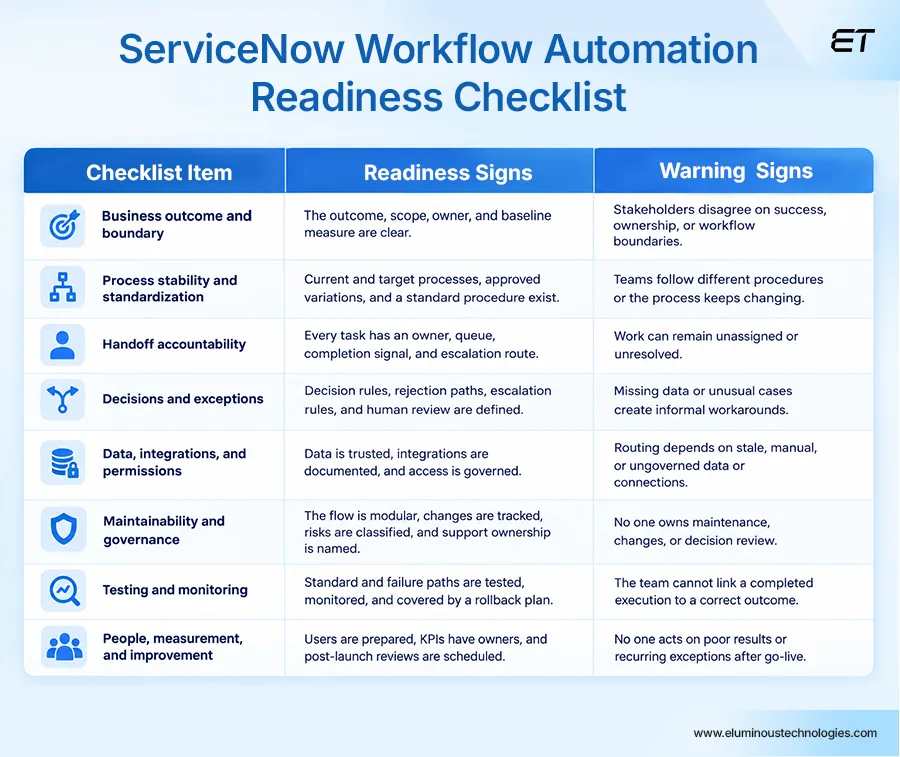
Before automating a workflow in ServiceNow, assess the process across eight areas: business outcome, process stability, ownership, exceptions, technical dependencies, maintainability, testing, and people.
Each area includes readiness signals and warning signs to help determine whether to proceed, address gaps, or pause automation.
1. Start With the Business Outcome and Boundary
When you think about automation, you may first imagine a feature request: creating a flow, adding an approval layer, or connecting two systems. But if the underlying process logic is flawed, automating it can reproduce the problem at scale.
A better starting point for ServiceNow workflow automation is to define the business problem first:
- Is an access request taking too long?
- Are onboarding tasks being missed?
- Are employees repeatedly asking for status updates?
Once the problem is clear, define the business outcome the workflow should achieve. Define where the workflow starts and ends, who participates, which systems are involved, and which cases fall outside its scope.
Then align stakeholders on the desired outcome and identify gaps in process design, ownership, and data. The ServiceNow implementation roadmap also points to process standardization before teams begin building.
For instance, an onboarding automation might look like this:
“Every approved employee access request is routed to the correct fulfillment team, completed within the agreed service level, and recorded for audit.”
The readiness signal at this stage would be an outcome statement, a defined scope, a process owner, and baseline measures. The warning signs include stakeholders having different definitions of success or disagreeing about who owns the process.
2. Check Whether the Process is Stable Enough to Standardize
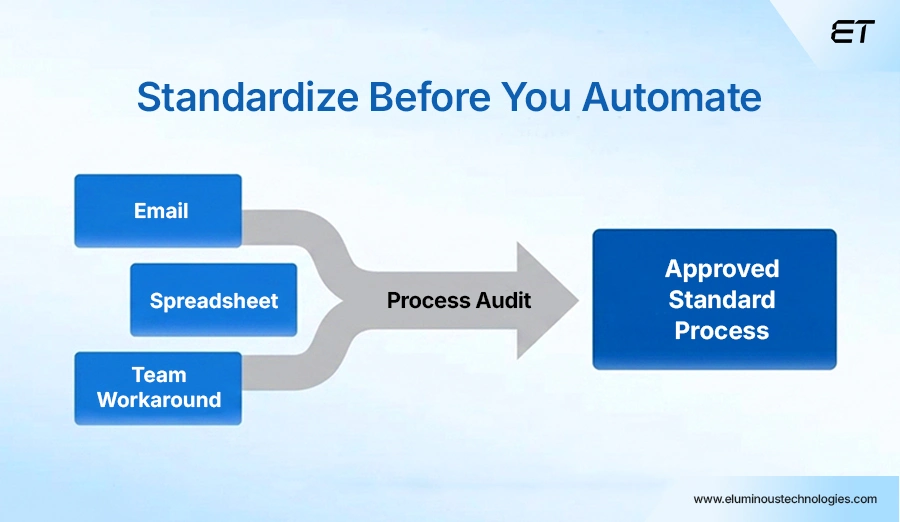
If three teams perform the same process in three different ways, the technology will not decide which version is correct. It will simply encode whichever version was documented first.
The discussion about ServiceNow workflow automation readiness needs to differentiate among policy requirements, workarounds, duplicate approvals, and unnecessary data entry. This enables discovery of the spreadsheet held by one coordinator, the duplicate approval, or the email transfer that nobody is accountable for.
The readiness signals in this case are current- and target-state maps, approved process variants, and an agreed-upon standard operating procedure. The warning signs to look out for are frequent redesigns and a lack of an accepted path.
3. Make Every Handoff Accountable
Cross-functional workflows can remain ‘in progress’ when no specific role or team is accountable for the next action and outcome.
Such workflows may seem efficient in discussions but can still stall the process in practice. A request can move across HR, IT, security, procurement, and finance, but without an owner, it fails to be resolved.
At this stage, move beyond naming a department and identify who is actually accountable for the work. A stronger readiness signal is a clearly defined role, group, queue, or assignment rule that receives the work.
Also define the required information, approval authority, service-level expectation, escalation path, and completion criteria.
Clear readiness signals include a responsibility matrix, assignment rules, defined approval authority, an escalation path, and completion criteria.
4. Describe Decisions and Exceptions
Once the standard path is defined, the workflow may appear ready for automation. But as execution starts, a field is missing, an approval is rejected, or a simple data duplication occurs, the process stops. Undefined exceptions can push users toward workarounds outside the ServiceNow workflow.
Before you decide on implementing the logic, identify and classify the decisions and exceptions the process must handle. Then, employ simple branches for conditional logic and nested rules through decision tables.
That said, not every exception should turn into another branch or nested rule; some should direct to human review, escalation, or process redesign.
You can automate predictable routing. At the same time, ambiguous cases should be routed to an appropriate expert with sufficient context to make the decision.
Readiness signals include a decision catalog, exception register, escalation rules, approval thresholds, and human-review criteria.
If these are unclear, clarify the process and the conditions triggering each decision before opting for branches, decision tables, or other implementation options. The warning signal is undefined decision ownership, incomplete data, a missing escalation path, or no human review process for an unusual result.
5. Validate Data, Integrations, and Permissions
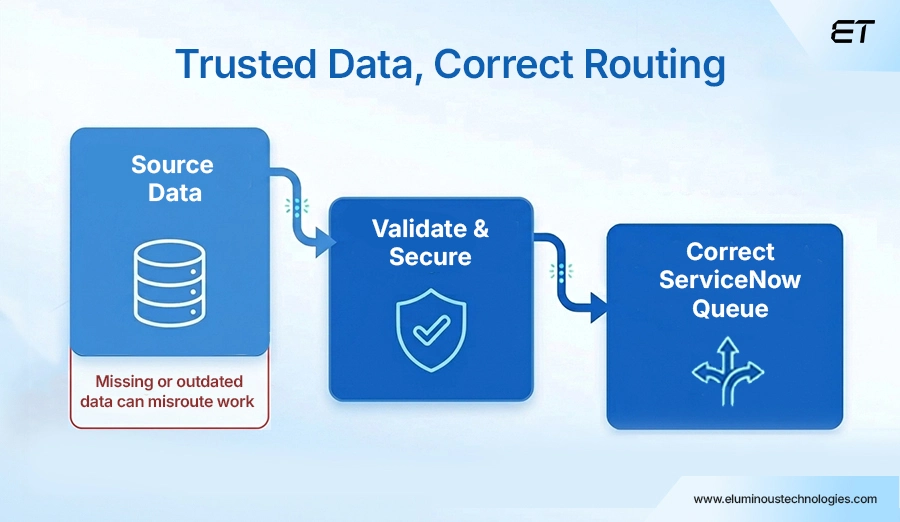
A workflow can be logically correct and still route work to the wrong team. One common reason is problems with the employees’ records, departments, locations, cost centers, configuration items, customers, and suppliers.
Cross-system dependencies introduce another risk. A workflow can be interrupted by a timeout, an unexpected response, or a rejected request from an external system.
For each critical data element, identify its source, owner, valid values, freshness requirements, and authoritative system. Also document the requests and responses, timeout behavior, failure notifications, and retry logic.
Access and security readiness in ServiceNow workflow automation need clear identity controls, secret management, and safeguards for handling sensitive information.
In ServiceNow, connection and credential aliases can be used to manage such core readiness requirements. Safe and secure connections reduce dependence on individual users.
Readiness signals include:
- Data dictionary
- Defined sources of truth
- Validation rules
- Integration inventory
- Interface contracts
- Named connection owner
- Credential rotation plan
- Least-privilege review
The warning sign can be as simple as the workflow depending on an unowned spreadsheet. It can also look like an integration connection tied to an individual user instead of a managed connection, credential alias, or service account.
6. Design for Maintainability and Governance
The first release is rarely the final version. Policies change, teams are reorganized, integrations are upgraded, and new exceptions appear. A flow that only its original designer understands can become a hidden dependency and a source of operational risk.
Start small. Short, modular flows and reusable subflows are far easier to maintain than a monolithic automation. Alongside, Git-based source control with branch logging for troubleshooting workflow automation is a suitable addition for when a process breaks.
Once you move from troubleshooting to review, naming conventions take center stage. You have to factor in future reviews and the ease of maintaining the process. That’s why consistent, human-readable naming and clear documentation are necessary.
The point is to ensure that someone other than the original builder can understand and fix it months later if needed.
Governance should also account for the risk associated with each automation.
An activity that changes permissions, money flow, customer commitments, or regulated data is high-stakes and requires in-depth scrutiny. It may require additional considerations, such as security reviews, separation of duties, and approvals.
During such a procedure, a clear warning sign is the absence of a designated owner for ongoing support, change management, and exception handling.
Readiness indicators include:
- Architecture diagram
- Modularity plan
- Naming standard
- Source-control approach
- Automation inventory
- Risk classification
- Approval matrix
- Change record, and
- Support owner
Ensure you consider these indicators during automation.
7. Prove the Outcome Through Testing and Monitoring
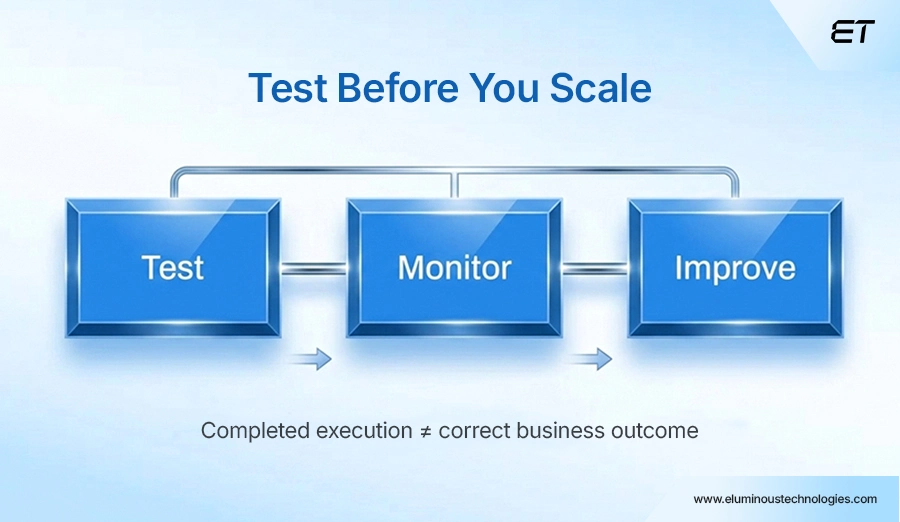
Test both the standard process and failure scenarios. This means analyzing rejected approvals, missing data, duplicates, integration failures, timeouts, retries, and permission failures. Verify the outcome in ServiceNow and downstream systems.
Successful workflow execution does not necessarily mean a successful business outcome. Monitoring should tie workflow execution back to the outcome it’s meant to achieve. This includes tracking branch outcomes, capturing useful context for failures, and assessing instances of stuck or failed execution.
ServiceNow suggests adding a log step for each potential branch point for debugging.
Readiness signals include:
- Concrete test plan
- Representative test data
- Documented results
- User-acceptance sign-off
- Monitoring dashboards
- Alert thresholds
- A support runbook, and
- A rollback plan
A key warning sign is when the team cannot distinguish between successful execution and a correct business outcome.
8. Prepare People, Measurement, and Improvement
ServiceNow automation alters both processes and responsibilities. The requester must understand what data is required. The approver needs clarity of expectations. The fulfillment team needs the option to escalate, and the support team requires guidance on investigating failures or delays.
When establishing a baseline, organizations should track metrics linked to the initial business challenge. Useful indicators can include:
1. Cycle time
2. Manual interventions
3. Exception volume
4. Rework
5. Backlog age
6. Service-level achievement
7. Failure rate
8. User satisfaction
The baseline helps determine whether automation improves performance rather than simply increasing activity. Regular reviews can turn recurring exceptions into improvement actions rather than allowing them to become permanent workarounds.
A training plan, support model, baseline metrics, KPI owner, review cadence, improvement backlog, and decommissioning plan are readiness evidence. These are not standalone proof that automation is ready. Consider them with the process, governance, technical, and testing criteria established earlier.
Include a decommissioning plan when the automation replaces an existing process or system. For new automation, document an appropriate rollback, retirement, or support plan instead.
Warning signs include having no owner responsible for monitoring workflow performance after go-live or no defined process for addressing poor results.
Make the Go/No-Go Decision and Plan the ServiceNow Workflow Automation Pilot
Readiness depends on business outcomes, process stability, ownership, decisions/exceptions, data, integrations, permissions, governance, testing, and people. Color-coding the workflow provides a quick, overall view of readiness across all workflows.
A green workflow is the safest, with a defined process, controls, data, ownership, and test evidence. An amber workflow has a defined standard path, but one or more readiness gaps remain. A red workflow has materially unclear outcomes, risks, ownership, or other critical readiness conditions.
| Status | Meaning | Recommended action |
| Green | The process, ownership, data, controls, and test evidence are sufficiently defined for the proposed scope. | Approve a controlled pilot, subject to normal change gates and production-readiness requirements. |
| Amber | The standard path is understood, but one or more dependencies, exceptions, metrics, or ownership decisions remain incomplete. | Resolve named gaps, narrow the scope, or run a time-boxed discovery before building. |
| Red | The outcome, process, data, risk, or ownership is materially unclear. | Do not automate yet. Redesign the process or establish the missing control first. |
A workflow may be green for a narrow pilot and amber for an enterprise rollout.
A practical 30-day pilot can follow the same logic.
- In Week 1, establish the outcome, scope, current process, participants, pain points, and baseline.
- Week 2 should define the target state, rules, exceptions, data ownership, integrations, and controls.
- In Week 3, configure the smallest useful slice using governed connections, modular components, logging, and representative test data.
- In Week 4, complete final testing, train users and support teams, launch the controlled pilot, and monitor the results.
Any expansion should be based on measured results against the baseline and evidence from the pilot.
Endnotes
An automation is only as efficient as the processes it governs. ServiceNow workflow automation is no different. It can ensure consistency and visibility, but the platform cannot resolve unclear ownership, contradictory rules, or poor-quality data on its own.
Readiness depends on business outcomes and stable process design.
The strong cases are those with processes that have clear rules, visible ownership, trusted data, measurable results, appropriate governance, and manageable exceptions.
Some workflows can require human judgment or approval by design. In those cases, define when human review is needed, how it should be handled, and what should be excluded.
If the team later considers embedding ServiceNow AI Agents, evaluate their role in the workflow. Check the data and permissions they need. But keep note of where human oversight remains necessary.
Use the checklist to decide whether to proceed with automation, narrow the scope, or address process gaps first. Once these foundations are in place, a controlled pilot can then validate the expected business outcome before broader rollout.
Need Help Preparing For ServiceNow Workflow Automation?

What Is ServiceNow AIOps and How Does It Work
Summary: ServiceNow AIOps helps IT teams turn operational data into actionable insights by correlating events, logs, metrics, and service context.…

ServiceNow ATF: When to Use It and Where It Delivers the Most Value
Key Takeaways: ServiceNow ATF is a native testing framework that automates regression testing. It helps teams validate changes faster and…


